

QR Code Attendance for Sports Academies: 3 Modes That Actually Work
Most sports academies in India still track attendance by hand. A coach calls out names while someone marks a paper register. Or athletes send "present" messages on WhatsApp. This approach works when you have 10 athletes. But it breaks down quickly as your academy grows beyond 20.
QR code attendance for sports academies solves this problem with a simple scan. But not all QR systems are built the same. Generic check-in apps do not understand what a "batch" means in a coaching context. They cannot handle an athlete enrolled in two groups at once. And they do not send real-time alerts to parents. This their child walks through the door.
This post explains how QR code attendance works in a sports academy setting. It covers three distinct modes designed for different setups. And it compares Sportia's system with tools like SalaryBox. OneTap, and Google Forms so you can make the right choice for your academy.
Why QR Beats Biometric Scanners and Manual Registers
Some academies invest in fingerprint scanners for attendance. These often fail in sports settings for reasons that are easy to predict. Sweaty hands after a warm-up session cause frequent read errors. Dust from an outdoor cricket ground adds another layer of problems. Rain makes fingerprint devices nearly useless. And most scanners need a power supply and fixed mounting point. Which is hard to arrange at a public park.
Paper registers come with a different set of issues. The coach must pause training to call out names and tick boxes. For a batch of 30 athletes, this can burn 10 minutes of valuable session time. Counting monthly attendance means flipping through pages and tallying marks by hand. Leaving room for errors and disputes with parents.
QR code attendance needs nothing more than a smartphone. There is no extra hardware to buy. No power supply to arrange at the venue. And no scanner that stops working when it rains. An athlete completes the check-in process in under 10 seconds. The coach stays on the field doing what they do best - coaching. And every check-in record goes straight to the cloud. This it can be accessed later for reports and billing.
Mode 1: Coach QR - Dynamic Code on the Coach's Phone
Coach QR is the easiest mode to start with at any academy. The coach opens the Sportia app. Selects the current batch. And taps "Start Attendance." A QR code appears on the phone screen. Athletes pull out their own phones. Open the app, and scan the code to check in.
The code refreshes every few seconds, which makes it tamper-proof. Athletes cannot take a screenshot. Share it with someone who is not at the ground. Only a person standing near the coach. At that exact moment, can complete a valid check-in.
When to Use Coach QR
- Athletes are teenagers or adults who carry their own smartphones
- Training happens at a park or open ground with no fixed entry point or reception
- The coach wants full control over when the check-in window opens and closes
How the Process Works
- Coach opens the Sportia app and selects the batch for that session
- A rotating QR code appears on the coach's phone screen
- Athletes scan the code using their own phones within the time window
- Each scan is recorded with a precise timestamp and linked to the athlete's profile
- Coach taps "End Attendance" when the check-in period is complete
The entire process takes about 2 to 3 minutes for a batch of 20 athletes. That is a massive improvement over the 10 or more minutes a paper register typically requires.
Mode 2: Location QR - Static Code at the Entrance
Location QR is designed for indoor venues with a clear entry point. You print a QR code once. Place it at the facility entrance or reception desk. Athletes scan the code as they walk in. The coach does not need to do anything at all.
The printed code is linked to the facility location in Sportia. The system knows which batches operate at that venue. At what times during the day. When an athlete scans the code. Sportia matches them to the correct batch based on the current time. Their sign-up records.
When to Use Location QR
- Indoor venues like swimming pools, gymnasiums, or badminton and tennis courts
- The facility has a defined entrance where athletes naturally pass through
- Multiple batches use the same space at different times throughout the day
Time Windows Keep the System Honest
You set a check-in window for each batch to prevent misuse. Say the evening batch runs from 5 PM to 7 PM. You can configure the check. In window to accept scans only between 4:45 PM and 5:30 PM. Any scan outside this window gets flagged or blocked entirely. Which prevents early or late check-ins from inflating attendance records.
Mode 3: Athlete QR - Perfect for Young Kids Without Phones
Many athletes at Indian sports academies are children between the ages of 6 and 12. They do not carry smartphones. Which means Coach QR and Location QR cannot work for them directly.
Athlete QR flips the scanning process around. Instead of the athlete scanning a code. The coach or a staff member scans the athlete's personal QR code. Each child receives a unique code that can be printed as a card. Attached as a sticker on their kit bag. Or displayed through the parent's app on their phone.
When to Use Athlete QR
- Young children under 12 years old who do not carry their own phones
- Parents drop off their children and want documented proof of check-in
- A staff member or assistant coach sits near the entry. Scans athletes as they arrive
Parents can print the QR code directly from Sportia's parent portal. Laminate the card. Clip it to the child's kit bag. And the child never needs to think about the check-in process again.
Cross-Batch Check-in: One Scan Handles Multiple Batches
This feature is where Sportia clearly stands apart from generic QR attendance apps. Many athletes at sports academies train in more than one batch. A cricketer might attend batting practice on Mondays and bowling practice on Wednesdays. Some attend two sessions on the same day. Like skills training at 5 PM followed by fitness training at 6 PM.
With most attendance tools. The coach has to mark the athlete one by one in each batch register. That means opening multiple lists, finding the same name, and ticking it twice. With Sportia, a single QR scan takes care of everything on its own.
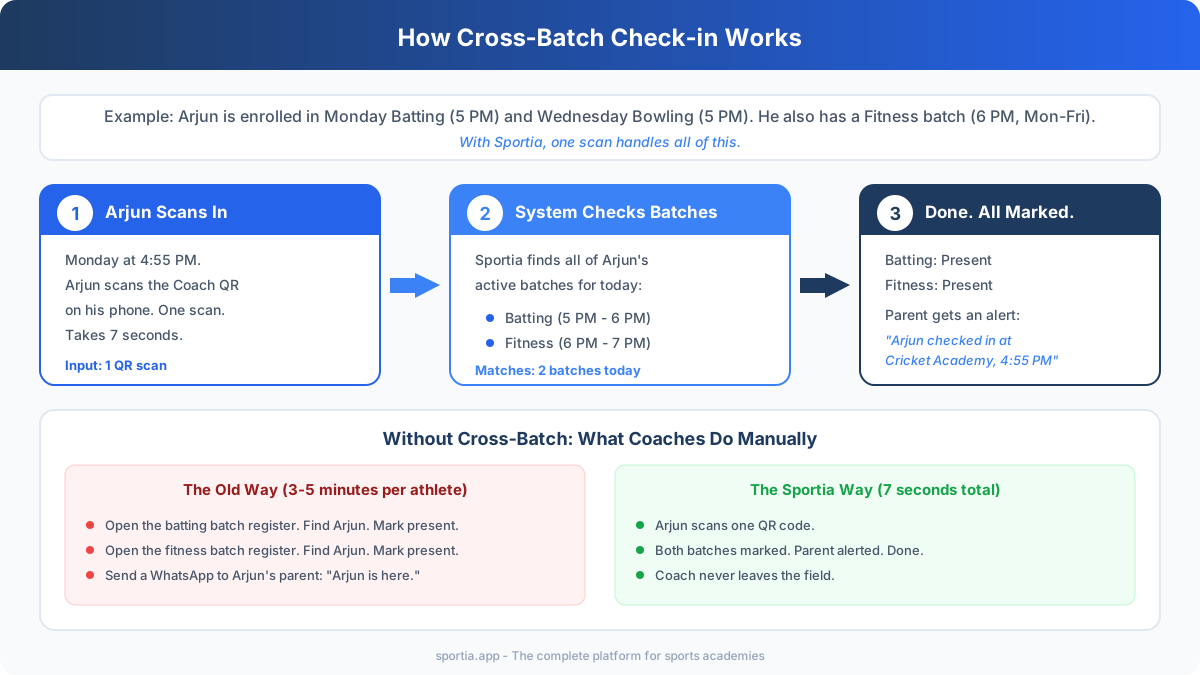
The system checks which batches the athlete belongs to on that particular day. It looks at the current time and matches it against the batch schedule. Then it records attendance for every relevant batch in one step. If the athlete has a session-based package with a limited quota. Sportia also deducts from the correct package balance.
Real-Time Parent Alerts on Check-in
Parents care deeply about one thing above all else: knowing their child is safe. When an athlete completes a QR check-in. Sportia sends a real-time alert to the linked parent. The message includes the child's name. The academy location, and the exact time of the scan.
This removes the need for coaches to manually send "your child has arrived" messages on WhatsApp after every session. The alert happens on its own the moment the scan is recorded. Parents get peace of mind without adding any extra work for the coaching staff.
Parents can also view complete attendance history through the parent portal. They can see exactly how many sessions their child attended in a given month. This information becomes valuable. This it is time to discuss fee renewals or. This parents question the value they are getting from the academy.
How Sportia Compares with Other QR Attendance Tools
Several QR attendance tools exist in the market today. But most of them were not designed with sports academies in mind. Here is how the main options stack up against each other.
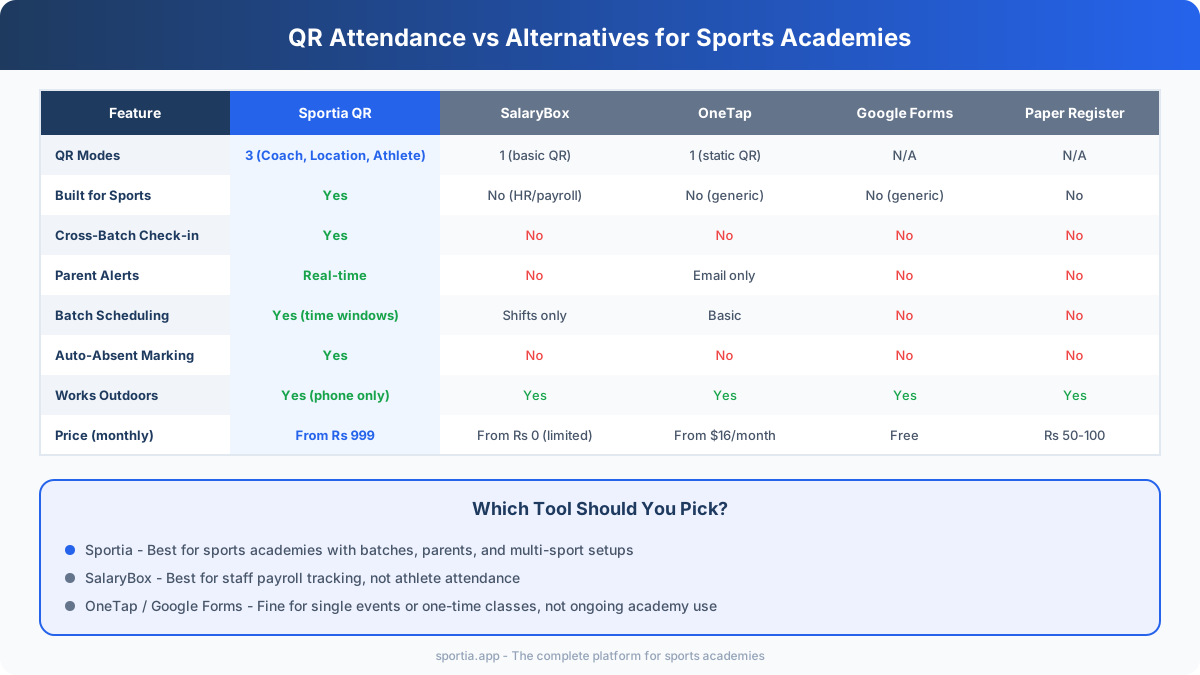
SalaryBox is an HR and payroll management tool. It tracks staff shifts, work hours, and salary math well. But it was not built for athlete attendance, parent contact, or training batch management. It is a solid choice for paying your coaching staff. But not ideal for tracking your athletes.
OneTap provides a clean and simple QR check-in experience. However, it offers only one QR mode, has no cross-batch support or parent portal features. Uses USD pricing that makes it expensive for most Indian academies running on tight budgets.
Google Forms is free and can work as a quick temporary solution. But it lacks built-in QR scanning feature. You need to create a separate form. Share the link manually, and hope athletes actually fill it in each time. There are no time windows, no automatic batch matching, and no parent alerts. It works for a one-time camp or workshop, but not for daily academy work.
Sportia is the only tool in this comparison that was purpose-built for sports academies. It offers all three QR modes. Automatic cross-batch check-in, real-time parent alerts, custom time windows, auto-absent marking, and complete batch scheduling. And it connects attendance data to the rest of your academy work including billing. Coaching plans, CRM, and athlete development tracking.
Ready to see how it works? Start a free 14-day trial and set up QR attendance for your academy in under 5 minutes.
Frequently Asked Questions
Which QR mode is best for a cricket academy?
For teenage and adult athletes who carry smartphones. Coach QR works best because the code rotates and prevents proxy check-ins. For young children under 12 years old. Athlete QR is the better choice since the coach scans the child's personal code directly.
Can QR attendance work without an internet connection?
Yes, Sportia stores check-in data locally on the phone. When the device connects to the internet later. All records sync to the cloud on its own. This makes QR attendance reliable at parks. Outdoor grounds where mobile signals can be weak.
How do I prevent proxy attendance with QR codes?
Coach QR uses a dynamic code that refreshes every few seconds, making screenshot sharing useless. Location QR uses custom time windows that block scans outside valid session hours. Together, these checks make proxy check-ins very difficult.
Does QR attendance work for multi-sport academies?
Yes, Sportia supports batch creation for any sport. An athlete can be enrolled in cricket batting, football training, and general fitness at once. A single scan on its own marks attendance for all matching batches scheduled on that particular day.
How much does QR attendance software cost for academies in India?
Generic attendance apps range from free to about Rs 2000 per month. Sportia starts at Rs 999 per month and bundles QR attendance with billing. Scheduling, parent portal, and coaching tools. A 14-day free trial is available to test the full platform before making a paying.
Can parents view their child's attendance reports?
Yes, Sportia's parent portal provides complete attendance history. Parents can see how many sessions their child attended each month. Along with check-in time stamps. They also receive real-time alerts the moment their child scans in at the academy.