
Parent Communication in Sports Academies: Moving Beyond WhatsApp Groups
Open any sports academy coach's phone and count their WhatsApp groups. Three batches, two locations, one parents-only group, and a general updates group. That is at least six groups to manage. And every single day, the same questions come in. "When is the next class?" "Was my child present today?" "How much are the fees this month?" Sports academy parent communication does not have to be this draining.
WhatsApp is great for quick chats. But it was never built to run an academy. This post covers why WhatsApp groups fall short for parent updates, what parents truly want to know, and how better tools can save coaches hours every week.
The WhatsApp Group Problem
Every academy starts with a WhatsApp group. It feels natural. Parents are already on WhatsApp. Creating a group takes 30 seconds. But within a few weeks, the problems start showing up.
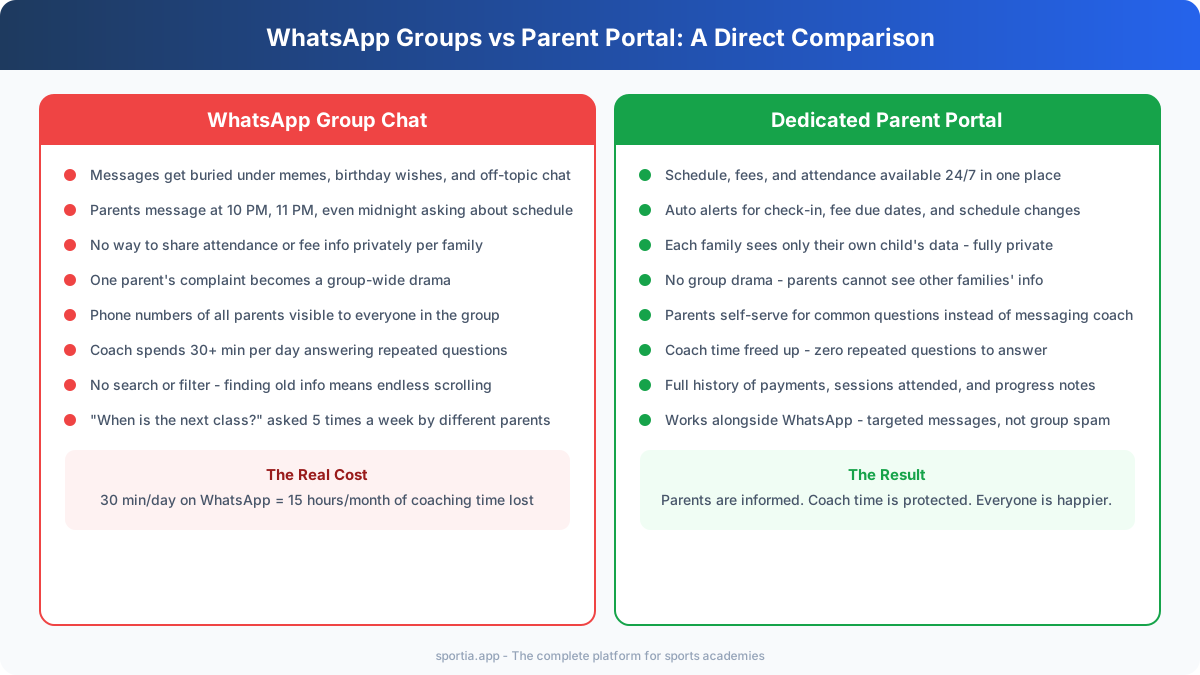
Noise drowns out real updates. A coach posts a schedule change at 9 AM. By noon, 40 messages about other topics have pushed it out of view. Birthday wishes, random forwards, and off-topic chats bury the important stuff.
Privacy goes out the window. Every parent in the group can see every other parent's phone number. One parent's fee dispute becomes visible to the whole group. Personal issues get aired in public. This erodes trust between the academy and families.
The coach becomes a 24/7 helpdesk. Parents message at 10 PM asking about next week's schedule. They ask at midnight if their child can skip a session. The coach's personal phone becomes a work phone with no off switch. This leads to burnout fast.
The same questions repeat every week. "What time is the Saturday batch?" "Is there a class on the holiday?" "Can you share the fee details?" Five parents ask the same thing on five different days. The coach answers the same question twenty times a month.
What Parents Actually Want to Know
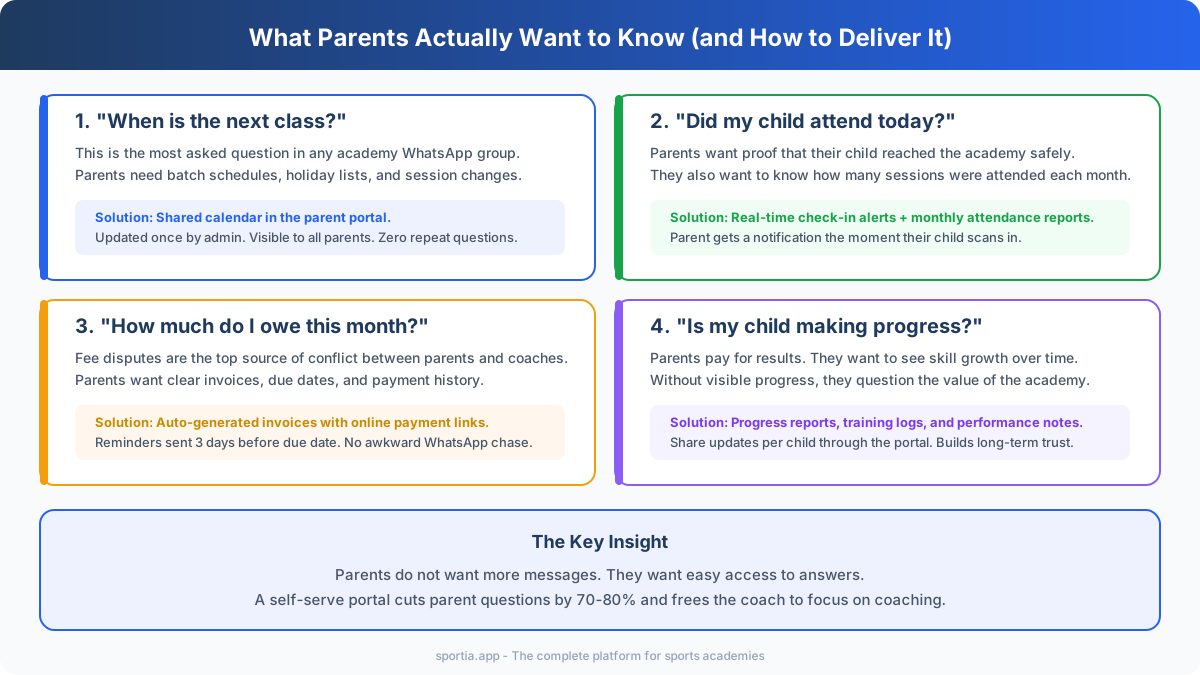
Parents do not want more messages. They want easy access to answers. When you break down every parent query your academy gets, it falls into four buckets.
Schedule and Timing
"When is the next class?" is the single most asked question at any academy. Parents need to plan their day around drop-off and pick-up. They want to know about holidays, batch time changes, and extra sessions. A shared calendar that parents can check on their own solves this problem fully.
Attendance and Safety
Did my child reach the academy? How many classes did they attend this month? Parents want this info for safety and for value. When they pay Rs 3,000 a month, they want to see that their child attended 20 out of 22 sessions. Real-time check-in alerts and monthly reports handle this need without a single WhatsApp message.
Fees and Payments
Fee confusion is the top source of conflict between parents and coaches. "How much do I owe?" "Did my last payment go through?" "When is the due date?" Clear invoices with due dates, online payment links, and payment history fix this. No more awkward DMs asking parents to pay up.
Progress and Development
Parents pay for results. If they cannot see their child making progress, they start to question the value. Sharing progress notes, skill ratings, or training logs gives parents visible proof that the coaching is working. Even a simple update like "Arjun's front foot drive has improved this month" goes a long way.
Structured Channels Beat Group Chats
The fix is not to delete WhatsApp groups. It is to stop using them for everything. Move the four types of info above into proper channels. Keep WhatsApp for what it does best - quick, casual updates.
Here is a simple framework that works:
| Type of Info | Best Channel | Not WhatsApp Group |
|---|---|---|
| Schedules and holidays | Shared calendar or portal | Gets buried in chat |
| Attendance records | Parent portal with auto alerts | No private per-child view |
| Fee invoices and receipts | Billing system with online pay | Privacy risk in group |
| Progress updates | Individual notes in portal | Not one-to-one in a group |
| Quick announcements | WhatsApp broadcast (not group) | Group works but is noisy |
| Urgent alerts (rain cancel) | WhatsApp broadcast or SMS | Group works fine for this |
Notice that WhatsApp still plays a role. But it handles only quick, one-way updates. The detailed, private, per-family data moves to a proper system.
Parent Portals: Self-Service Access for Parents
A parent portal is a login page where each parent sees only their own child's data. Schedule, attendance history, fee invoices, and progress notes - all in one place. The parent opens it whenever they want. No need to message the coach.
This is not a fancy app that parents need to download. Most parent portals work in a web browser. Share the login link once. Parents bookmark it and check it on their own time.
What a good parent portal shows:
- Batch schedule with dates, times, and any changes
- Attendance log with check-in time stamps for each session
- Fee invoices with due dates, payment status, and online pay links
- Progress notes or skill ratings shared by the coach
- Academy contact info and policies
The biggest win is what it removes from the coach's plate. When parents can look up answers on their own, the flow of repeated questions drops sharply. Many academies report a 70 to 80 percent drop in parent queries after setting up a portal.
Auto Alerts That Replace Manual Messages
Sending "your child is here" on WhatsApp for 30 athletes every day is not a good use of coaching time. Auto alerts handle this in the background. No manual work at all.
Here are the five alerts that matter most:
- Check-in alert: "Arjun checked in at 5:02 PM at Cricket Academy." Sent the moment the child scans the QR code. Parents know their child is safe.
- Fee reminder: "Fee of Rs 3,000 is due on March 25. Pay online here." Sent 3 days before the due date. Reduces late payments.
- Schedule change: "Saturday batch on March 22 is cancelled due to rain. Next session: Monday March 24." Sent once by admin. All parents get it.
- Absent alert: "Arjun was not present at today's session (March 20)." Helps parents track their child's attendance pattern.
- Payment received: "Payment of Rs 3,000 received. Thank you." Instant proof of payment. No more "did you get my payment?" messages.
These five alerts cover 90 percent of what parents ask about. They run on their own after setup. The coach does not lift a finger.
WhatsApp Done Right: Targeted Messages, Not Group Spam
You do not need to quit WhatsApp. You need to use it better. Here is how:
Use broadcast lists, not groups. A broadcast list sends the same message to many people, but each person gets it as a private chat. They cannot see who else got it. They cannot reply to the group. This stops the noise problem.
Use WhatsApp for one-way updates only. Rain cancellations, event dates, holiday notices. These are perfect for WhatsApp. Short, time-sensitive, one-way.
Move all two-way and private chats to a proper system. Fee questions, attendance queries, progress updates - these need a private channel where each family sees only their own data. A management tool with WhatsApp integration can send targeted messages to the right parent at the right time, without a group chat.
Tools like Sportia offer built-in WhatsApp integration through Wamafy, their own WhatsApp Business API platform, or through WATI. This means auto alerts (check-in, fee reminders, schedule changes) go out via WhatsApp itself, but they are targeted per family. Parents get the messages on an app they already use, without any group noise.
Setting Boundaries: Protect Your Coaching Time
Clear rules about how and when parents can reach you save everyone time and stress. Put these in writing when a family first joins.
- Set response hours: "Parent queries are answered between 9 AM and 7 PM, Monday to Saturday." Stick to this. Do not reply at midnight.
- Point to the portal first: When a parent asks a question that the portal answers, reply with: "You can find this in your parent portal." Train parents to check before they message.
- Use a single contact point: Have one phone number or email for academy queries. Do not let parents message every coach's personal number.
- Share a FAQ sheet at sign-up: Cover the 10 most common questions (fees, schedule, holidays, make-up classes). Print it or share it as a PDF. This prevents most first-month questions.
- No fee talks in groups: Make it a rule that fee matters are handled only through invoices and private messages. Never in the group chat.
These rules are not harsh. They are fair. Parents respect coaches who run a tight ship. And coaches who protect their time deliver better coaching.
Frequently Asked Questions
Should sports academies stop using WhatsApp for parent updates?
No, but use it only for quick one-way updates like rain cancellations and event notices. Move detailed info like attendance, fees, and progress to a parent portal. Use WhatsApp broadcast lists instead of group chats to avoid noise and privacy issues.
What is a parent portal for sports academies?
A parent portal is a web-based login where each parent can view their child's schedule, attendance history, fee invoices, and progress notes. It works in any browser. Parents check it on their own time, which removes the need to message the coach for basic info.
How do auto alerts reduce coach workload in academies?
Auto alerts send check-in notices, fee reminders, and schedule updates to parents without the coach doing anything. These five types of alerts cover about 90 percent of what parents ask about. They run in the background once set up and free the coach to focus on training.
How can I handle late-night messages from parents?
Set clear response hours in writing from the first day. Share them at sign-up. For example, "Queries answered 9 AM to 7 PM, Monday to Saturday." Point parents to the portal for answers outside these hours. Do not reply to late-night messages to avoid setting a bad pattern.
What is the difference between a WhatsApp group and a broadcast list?
In a group, every member sees all messages and can reply to everyone. In a broadcast list, your message goes to each person as a private chat. They cannot see other recipients. They cannot create group noise. Broadcast lists are better for academy updates where parents do not need to reply.
How do I transition from WhatsApp groups to a parent portal?
Start by setting up the portal and sharing login details with parents. Run both systems for two weeks. Post all updates on the portal and share a link in the WhatsApp group saying "check the portal for details." After two weeks, reduce WhatsApp group activity to urgent-only updates. Most parents adapt within a month.