
Spreadsheets vs Academy Software: When Excel Stops Working
Almost every sports academy in India runs on a spreadsheet. Attendance in one sheet. Fees in another. A WhatsApp group to hold it all together.
This is not a mistake. A spreadsheet is a genuinely good first system. It is free, it is flexible, and you already know how to use it.
But a sports academy Excel spreadsheet does not fail loudly. It fails quietly, over months. One day you cannot tell a parent whether their child attended on the 14th. That is the moment you find out the system stopped working a long time ago.
This guide covers what spreadsheets do well, exactly where they break, and how to tell which side of the line you are on.
What Spreadsheets Genuinely Do Well
Start with the honest case for Excel and Google Sheets. Any article that skips this is selling you something.
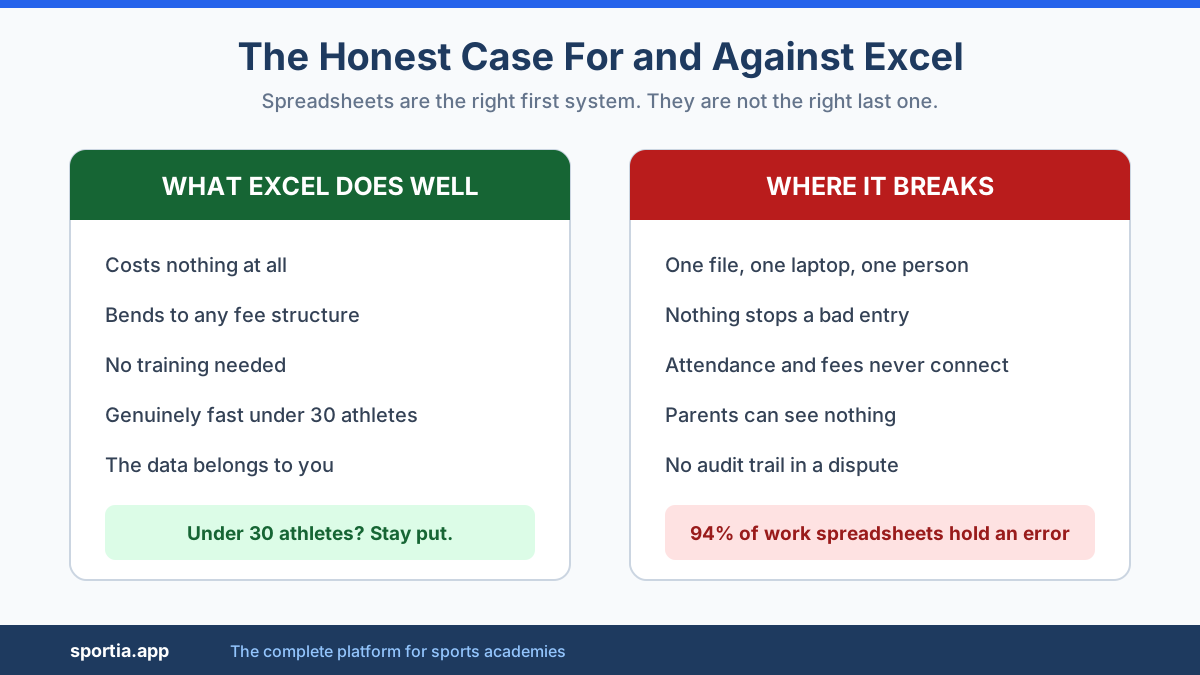
- They cost nothing. For an academy with 20 athletes and thin margins, that matters more than any feature.
- They bend to any shape. Odd fee structure? Weird batch timing? Add a column. No software will ever be this flexible.
- You already know them. No training, no onboarding, no new login for your coaches.
- They are fast for small numbers. Under about 30 athletes, a well-built sheet is genuinely quicker than any app.
- The data is yours. No vendor, no subscription, no export request.
If you have 25 athletes in one batch at one ground, stay on your sheet. Seriously. The rest of this article is about what happens after that.
Where Spreadsheets Actually Break
The failure is not that spreadsheets are hard to use. It is that they were never built for several people updating live events.
One file, one laptop, one person
Your master sheet lives somewhere. Usually your laptop. Sometimes a Google Drive folder only you can find.
So every update flows through you. A coach cannot mark attendance. A parent cannot check a balance. You become the bottleneck for your own academy, and you will notice this most on the days you are ill or travelling.
Version chaos
You share the fee sheet with your partner. They edit their copy. You edit yours. Now there are two truths and no way to merge them.
Google Sheets solves the concurrent editing problem. It does not solve the next one.
Nothing stops a bad entry
A spreadsheet accepts anything you type. Wrong date, wrong batch, wrong amount, a formula dragged one row too far.
This is not a small risk. Research auditing real operational spreadsheets has repeatedly found that around 94 percent contain at least one error, with a typical cell error rate near 5 percent. Your fee sheet is an operational spreadsheet.
An academy software refuses invalid entries. A sheet quietly accepts them and carries them forward for months.
The data does not connect
This is the deepest problem. In a spreadsheet, attendance and fees live in separate files that know nothing about each other.
So you cannot answer questions like: which athletes attended less than half the sessions and still owe fees this month? That question takes a real system seconds. In spreadsheets it takes an hour of manual cross-referencing, so you stop asking it.
What Parents Cannot See
Here is the cost nobody counts. A spreadsheet is invisible to the people paying you.
A parent cannot check whether their daughter attended on Tuesday. They cannot see how many sessions are left in a package. They cannot pull up an old receipt.
So they ask you. Every one of those questions becomes a WhatsApp message you answer manually. Ten families asking twice a month is 20 interruptions.
Worse is what happens in a dispute. A parent says they paid in cash in June. Your sheet says they did not. You have no receipt trail and no timestamp. You back down, because the alternative is losing the family.
Do that five times a year at Rs 4,000 each and it is Rs 20,000 gone. Not from bad luck. From having no record either side can trust.
This is the same trust gap covered in our comparison of WhatsApp groups versus academy management software. The spreadsheet version is quieter but costs the same.
The Hidden Hours
Ask an academy owner how long admin takes and most say "an hour or two a week". Then they actually count.
Month-end reconciliation alone runs 6 to 8 hours for a business tracking attendance manually. That is cross-checking registers, chasing gaps, fixing half-days and typing it all into a fee sheet.
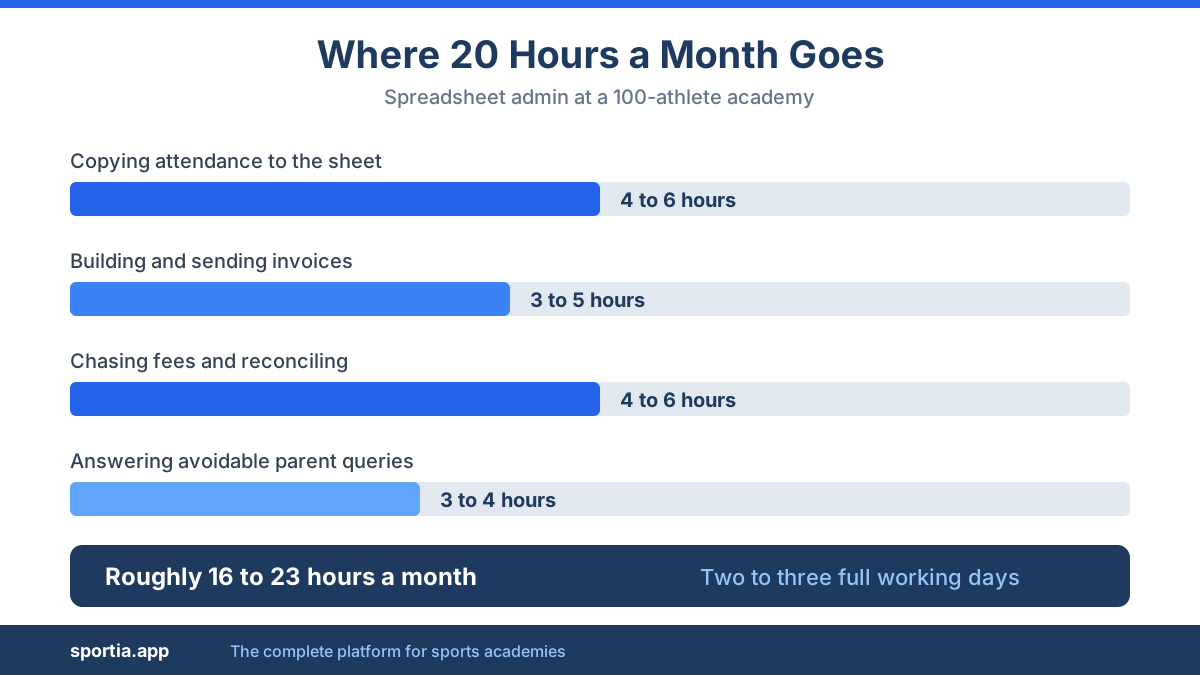
For a 100-athlete academy, a realistic monthly picture looks like this:
- Copying attendance from register to sheet: 4 to 6 hours
- Building and sending invoices: 3 to 5 hours
- Chasing pending fees and reconciling payments: 4 to 6 hours
- Answering parent queries you could have avoided: 3 to 4 hours
- Fixing errors you find later: 2 hours
That is roughly 16 to 23 hours a month. Two to three full working days spent copying numbers between files.
Price your own time at even Rs 300 an hour and that is Rs 5,000 to Rs 7,000 of your month. Most academy software in India costs less than that, which reframes the "we cannot afford it" objection entirely.
And errors carry their own price. Businesses tracking attendance manually lose an estimated 2.8 percent of payroll to attendance mistakes. If you pay coaches per session from a hand-kept register, that leak is yours too.
Data Loss, Key-Person Risk, and Compliance
Now the part almost nobody plans for.
Picture a typical failure. The laptop holding the master file dies. The last backup was in January. Three years of fee history, attendance records and parent contacts are gone. Nobody was careless. There was simply never a second copy.
Then there is key-person risk. If one person built the sheet, only that person understands it. When they leave, the formulas become a mystery nobody can safely edit.
But the compliance angle is the one Indian academy owners miss most.
If your academy is registered under GST, Section 36 of the CGST Act requires you to keep books and records for 72 months from the due date of the annual return. Income tax rules expect books preserved for 6 years from the end of the relevant assessment year. Establishments covered by state Shops and Establishments rules typically must hold records for at least 3 years.
Now ask the honest question. Can a single Excel file on one laptop reliably produce clean, complete records from four years ago if the department asks?
For most academies the answer is no. That is not an efficiency problem. That is a risk you are carrying without knowing it.
A spreadsheet is not just a slower system. Past a certain size it becomes the only business record you have, stored in the least safe way available.
What Breaks First, and When
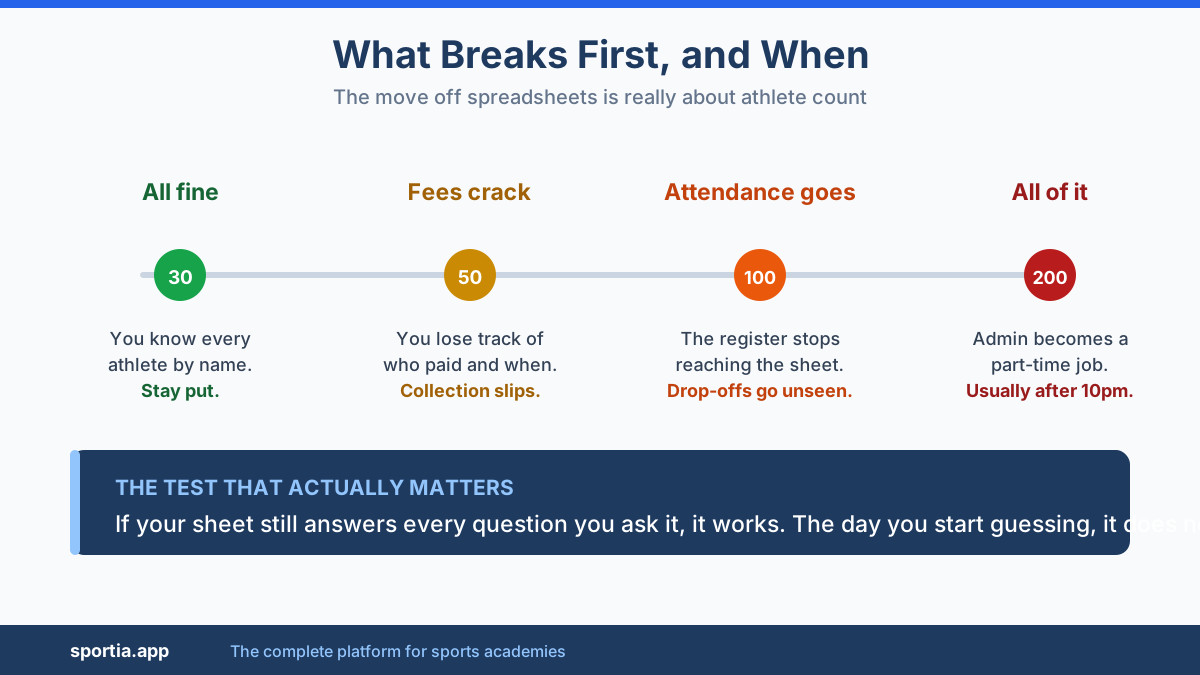
The move off spreadsheets is not really about features. It is about athlete count. Here is the pattern most academies follow.
Up to 30 athletes
Spreadsheets work fine. You remember every athlete by name. You know who has paid without looking. Stay put and put the money into coaching instead.
Around 50 athletes
Fee tracking cracks first. You lose the thread on who paid and when. Reminders get inconsistent, so collection slips. You start dreading month-end.
Around 100 athletes
Attendance breaks next, especially with multiple batches or coaches. The register no longer reaches your sheet reliably. Parent queries become a daily interruption. You cannot tell which athletes are drifting until they have already left.
Around 200 athletes
Everything breaks together. Multiple locations, multiple coaches, packages and monthly fees mixed. At this size, spreadsheet admin is a part-time job, and you are usually the one doing it after 10pm.
If several of these sound familiar, our post on the signs your academy has outgrown its current setup goes deeper on the symptoms.
Spreadsheet vs Academy Software: Side by Side
| What you need | Spreadsheet | Academy software |
|---|---|---|
| Cost | Free | From about Rs 999 a month |
| Flexibility | Total | Within the product |
| Coach access at the ground | No | Yes, on mobile |
| Parent visibility | None | Parent portal and app |
| Attendance linked to fees | Manual | Automatic |
| Invoice generation | Manual | Automatic, with pro-rata |
| Payment reconciliation | Manual | Linked to the gateway |
| Error prevention | None | Validation on entry |
| Audit trail | None | Timestamped |
| Backup and retention | Your responsibility | Handled by the platform |
| Works if you are unavailable | No | Yes |
| Setup effort | None | A few hours |
A Realistic Migration Path
The fear that stops most owners is losing history mid-season. That fear is fair, and the fix is to move in stages rather than all at once.
- Export what you have. Save your athlete list, batch list and fee history as CSV files. Do this even if you never migrate. It is your backup.
- Clean before you import. Fix phone number formats, remove athletes who left, standardise batch names. Migration is a good excuse to delete the dead rows you have been scrolling past for a year.
- Import athletes and batches first. Not fees. Get the structure in and confirm it looks right.
- Run both systems for one month. Mark attendance in the software and keep your sheet going in parallel. Compare at month end. This is the step people skip and then panic.
- Move fees next month. Once attendance is trusted, switch invoicing over. Keep the old sheet as read-only history.
- Bring coaches and parents in last. Add coach logins once you trust the data, then open the parent portal.
Budget a few hours across a month, not a lost weekend. Our step-by-step guide to digitising a sports academy covers the full sequence.
Sportia was built for exactly this transition. Athletes and batches import from CSV, attendance can be marked on mobile or by QR code at the ground, invoices generate from enrollment automatically, and parents get their own portal. The point is that attendance, fees and enrollment stop being three unconnected files.
When Staying on a Spreadsheet Is Still Right
Software is not always the answer. Stay where you are if:
- You have under 30 athletes in one batch at one location.
- You collect fees once a year, not monthly.
- You are testing whether the academy works at all. Do not systemise an experiment.
- Your season is 8 weeks long, like a summer camp.
- Admin genuinely takes under 2 hours a month and nothing is slipping.
The test is simple. If your spreadsheet still answers every question you ask it, it is working. The day you start guessing, it is not.
Frequently Asked Questions
Can I run a sports academy on Excel?
Yes, up to a point. Under about 30 athletes at one location, a well-built sheet is cheap and fast. The limits show up around 50 athletes for fee tracking and around 100 for attendance, when the data stops reaching the sheet reliably.
What is the biggest problem with using spreadsheets for academy management?
Attendance and fees sit in separate files that do not talk to each other. That means you cannot answer combined questions, like which athletes are attending poorly and also owe money, without an hour of manual cross-referencing.
How many athletes before a sports academy needs software?
Most academies feel real pain around 50 athletes and cannot cope past 100. The trigger is less about the count and more about complexity. Multiple batches, multiple coaches or two locations will break a spreadsheet well before 100 athletes.
Is Google Sheets better than Excel for a sports academy?
Yes, for one reason. Google Sheets allows several people to edit the same file and keeps version history, which removes the worst of the version chaos. It does not fix data entry errors, parent visibility, or the disconnect between attendance and fees.
How long do Indian academies need to keep fee records?
If you are GST registered, Section 36 of the CGST Act requires 72 months from the due date of the annual return. Income tax rules expect 6 years from the end of the relevant assessment year. Confirm your position with a chartered accountant, and ask whether one laptop file can meet it.
Will I lose my data if I move from a spreadsheet to academy software?
Not if you migrate in stages. Export your sheets to CSV first as a backup, import athletes and batches before fees, and run both systems in parallel for one month before switching over fully.
The Bottom Line
Spreadsheets are not the enemy. They are the correct first system, and every academy should start there.
But a spreadsheet only records what someone remembers to type. As you grow, the gap between what happened and what got typed widens. Eventually the sheet stops being a record and becomes a rough guess.
Watch for three signals: you are guessing about who paid, parents are asking questions you cannot answer quickly, and month-end takes a full day. Any one of those means the spreadsheet is now costing more than software would.
Sportia connects attendance, enrollment, invoicing and parent access in one place, starting at Rs 999 a month. Start a free 14-day trial and import your existing spreadsheet to see how your academy looks when the data finally connects.