

How to Digitize Your Sports Academy in 2026: A Step-by-Step Guide
Most sports academies in India still run on WhatsApp groups and Excel sheets. The coach marks attendance on paper. Fees get tracked in a notebook. Parents get updates through group messages that no one reads. And every month, the owner spends hours sorting out who paid and who did not.
This approach functions adequately when you have 10-15 students. But once you cross 30 athletes, it starts to break. Messages get lost. Fees slip through the cracks. Parents complain about lack of updates. And you spend more time on admin work than on coaching.
If you want to digitize your sports academy, you do not need to change everything at once. This guide shows you how to move from WhatsApp and Excel to a proper digital system, one step at a time.
Why WhatsApp and Excel Stop Working at 30+ Athletes
WhatsApp is great for quick messages. Excel is great for simple lists. But neither was built to run a sports academy. Here is where they break down:
- Attendance: Paper registers get lost. No one goes back to check data from 3 months ago. Parents call to ask "did my child attend today?" and you have no quick answer.
- Fees: You track payments in a sheet. But when 5 students join mid-month, 3 pay late, and 2 get sibling discounts, the sheet becomes a mess. Chasing fees on WhatsApp is awkward and slow.
- Schedules: Every time a session changes, you message 5 groups. Some parents see it. Some do not. Kids show up at the wrong time.
- Leads: A parent calls asking about trial classes. You write their name on a sticky note. Two days later, the note is gone. The lead is lost.
- Growth: At 50+ athletes, you cannot keep everything in your head. You need a system that works even when you are not looking at it.
The hidden cost of manual systems is significant amounts of wasted time. Most academy owners spend 5-10 hours per week on admin tasks that software can handle in minutes. That is time you could spend coaching, marketing, or simply taking a break.
If any of this sounds familiar, read our post on 5 signs your academy needs management software.
The 5 Systems Every Academy Needs to Digitize
You do not need to go digital on everything at once. Focus on these 5 areas in order. Each one builds on the one before it.
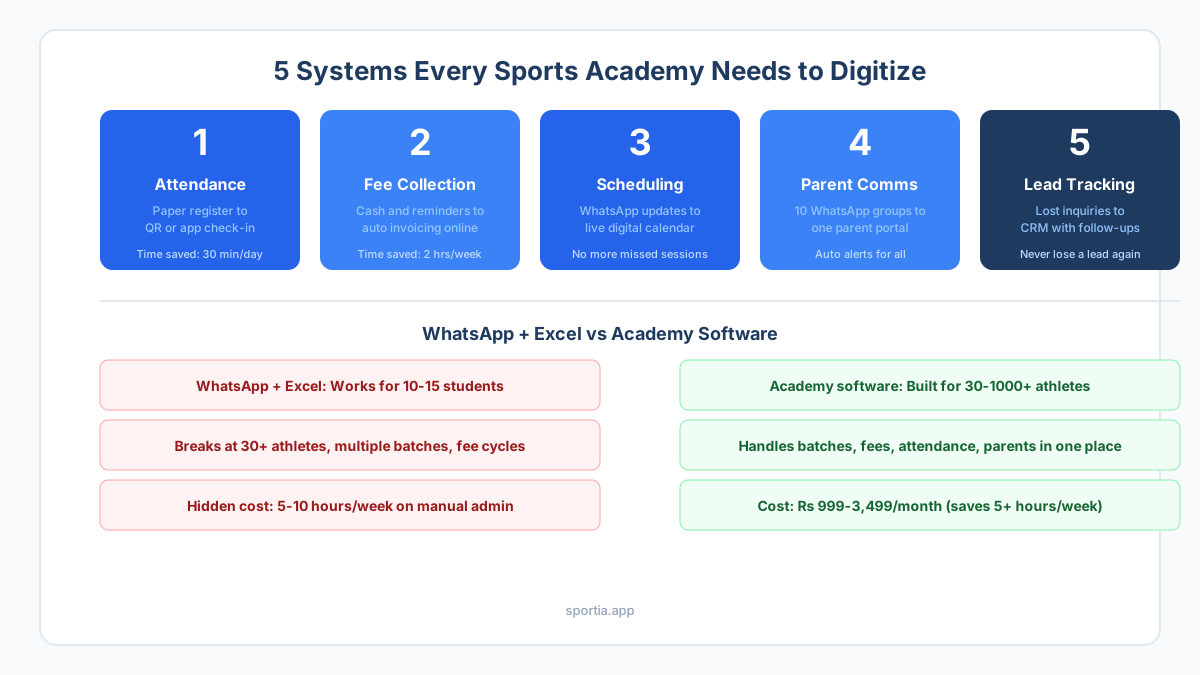
Step 1: Move Attendance from Paper to Digital
This is the easiest win and the best place to start. Replace your paper register with a digital check-in system.
How It Works
- QR code check-in: Print a QR code at the training ground. Athletes or parents scan it when they arrive. Attendance is marked in seconds.
- Coach marks on app: The coach opens the app, sees the batch list, and taps to mark who is present. Takes less than 2 minutes per batch.
- Auto parent alerts: When a child is marked absent, the parent gets a message right away. No need for you to call or text.
Why This Matters
Digital attendance gives you data. You can see which athletes miss often. You can spot drop-off trends early. And parents trust you more when they get real-time updates. Read our full guide on how digital attendance tracking works for academies.
Step 2: Set Up Online Fee Collection and Auto Invoicing
Fee collection is where most academies waste the most time. Moving this online solves two problems at once: you get paid faster and you stop chasing people on WhatsApp.
What to Set Up
- Auto invoices: The system creates an invoice for each student at the start of their billing cycle. Monthly, quarterly, or custom. You do not touch it.
- Payment links: Parents get a link to pay online via UPI, card, or net banking. No cash handling needed.
- Reminders: If payment is not received by the due date, the system sends a polite reminder. You are not the bad guy.
- Pro-rata billing: A student joins on the 15th? The system auto-calculates the half-month fee. No manual math.
- Payment dashboard: See who paid, who is late, and total revenue in one screen.
For more on this, read our guide on how to set up the right fee structure for your academy.
Step 3: Create a Digital Schedule That Everyone Can See
No more "what time is class today?" messages. A digital schedule is always up to date and always visible to parents, coaches, and athletes.
What Changes
- Live calendar: All sessions, batches, and events show on a shared calendar. Parents see it on their phone. Coaches see it on theirs.
- Session changes: Cancel or shift a session, and everyone who needs to know gets a message right away. No group chat needed.
- Batch management: Assign athletes to batches. Set days, times, and coaches for each one. The system keeps it all straight.
- Sub coaches: If a coach is out sick, assign a sub with one tap. The parents of that batch get a heads-up.
Step 4: Replace WhatsApp Groups with a Parent Portal
WhatsApp groups are the biggest source of chaos in most academies. Parents ask the same questions. Messages get buried. And one complaint turns into a group fight.
A parent portal fixes this. It gives each parent a clean view of their child's data without the noise of a group chat.
What Parents See
- Attendance records for their child
- Fee history and pending payments
- Session schedule and any changes
- Messages from the academy (one-way, no group drama)
You still use WhatsApp for quick personal chats. But the bulk of parent updates - attendance, fees, schedule - flow through the portal. This cuts your WhatsApp message load by 70-80%. Read more about moving beyond WhatsApp for parent updates.
Step 5: Track Leads and Trials with a Simple CRM
Every academy loses leads. A parent calls about a trial class. You say "come on Saturday." Saturday comes and they do not show up. You forget to follow up. They join the academy down the street.
A CRM (customer relationship manager) is just a list of people who asked about your academy, with reminders to follow up.
What It Does
- Log every inquiry that comes in (call, WhatsApp, walk-in, website form)
- Schedule trial sessions and track who showed up
- Set follow-up reminders so no lead falls through
- Track how many leads turned into paying students
Even a basic CRM can improve your trial-to-enrollment conversion rate by 20-30%. Most academies do not use one because they do not know it exists in their software.
How to Get Staff and Parents On Board
The tool is only half the job. Getting people to use it is the other half. Here is what works:
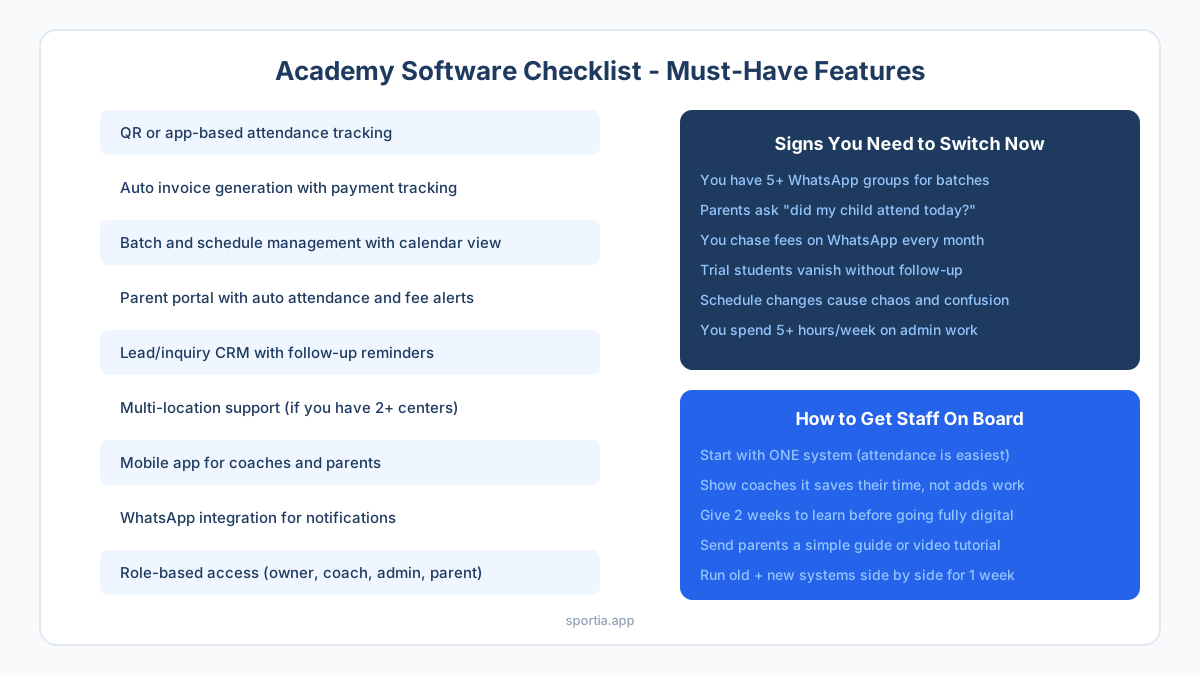
For Coaches
- Show them it saves time, not adds work. Demo the app in 10 minutes.
- Start with attendance only. Let them get used to it before adding more.
- Give them 2 weeks to learn. Do not force a full switch on day one.
For Parents
- Send a short message: "We are upgrading to a new system for better updates."
- Share a 2-minute video or screenshot guide showing how to log in.
- Run the old system and new system together for 1 week. Then stop the old one.
For Yourself
- Pick one system to start (attendance is the easiest first win).
- Do not try to set up everything in one day. Roll out one feature per week.
- Check in after 30 days. See what is working and what needs fixing.
What to Look for in Academy Software
Not all tools are built the same. Here is a quick checklist of features that matter for Indian sports academies:
- QR or app-based attendance with parent alerts
- Auto invoice creation and online payment support (UPI, card)
- Batch and schedule management with a calendar view
- Parent portal with fee and attendance history
- Lead/inquiry CRM with follow-up reminders
- Multi-location support (if you have more than one center)
- Mobile app for both coaches and parents
- WhatsApp integration for notifications
- Role-based access control (owner, coach, admin, parent)
- Pricing in INR with Razorpay or UPI payment support
Platforms like Sportia cover all of these. They are built for Indian sports academies, with pricing starting at Rs 999/month. You can set up your academy in under an hour and start tracking attendance the same day.
Frequently Asked Questions
How long does it take to digitize a sports academy?
You can set up basic attendance and fee tracking in 1-2 hours. A full setup with batches, schedules, and parent access takes about a week. Roll out one feature at a time for the smoothest switch.
Do I need technical skills to use academy software?
No. Most academy tools are designed for non-technical users. If you can use WhatsApp, you can use academy software. Look for tools with a guided setup wizard and mobile app support.
When should an academy switch from WhatsApp and Excel to software?
The tipping point is around 30 athletes. Before that, WhatsApp and Excel work fine. After 30, you start losing time on admin, missing fee payments, and dropping leads. That is when software pays for itself.
How much does sports academy software cost in India?
Most tools charge Rs 999-3,500 per month based on the number of athletes and features. Some offer free trials. The cost is far less than the hours you waste on manual tracking each week.
Will parents be willing to use a new app or portal?
Yes, if you make it easy. Send a short intro message, share a 2-minute guide, and run both systems for one week. Most parents prefer the portal once they see their child's attendance and fee history in one place.
Can I import my existing student data into academy software?
Most platforms let you import data from Excel or CSV files. You can bring in student names, contact details, batch info, and fee records. Some tools even help you with the import for free.