
How to Manage Multiple Sports Academy Locations Without Losing Control
Opening a second location feels like a big win for any sports academy. More space, more athletes, more revenue. But within a few weeks, most owners learn the truth. Running two centers is not twice the work. It is five times harder.
When you run more than one location, problems grow fast. Each coach does things their own way. Fees get tracked in two sheets. Parents get lost on timings. You spend half your day driving between centers. Coaching takes a back seat.
This guide shows how to manage more than one location without losing control. It covers when to expand, how to set up clear processes, what access to give each staff role, and how the right tools hold it all together.
When Is Your Academy Ready for a Second Location?
Not every academy is ready to expand. Opening too early is one of the top reasons academies fail. Here are signs you are ready:
- Your current batches are consistently full. If 2 or more age groups have a waitlist, your space has run out. That is the clearest sign.
- You have turned away students from a specific area. If parents from a nearby area keep asking but your location is too far, a second center near them makes sense.
- Your revenue covers your costs with margin to spare. Save at least 3-6 months of profit. The new center will take time to fill up, and you need cash to cover costs while it grows.
- You have at least one coach you can trust to run things independently. If things fall apart when you leave, you are not ready. You need a head coach or manager who can run the show without you.
If you are still growing your first location, focus on filling batches there before thinking about a second one. Read our guide on scaling from 10 to 100 athletes for tips on maximizing your current setup.
The Biggest Challenges of Running Multiple Locations
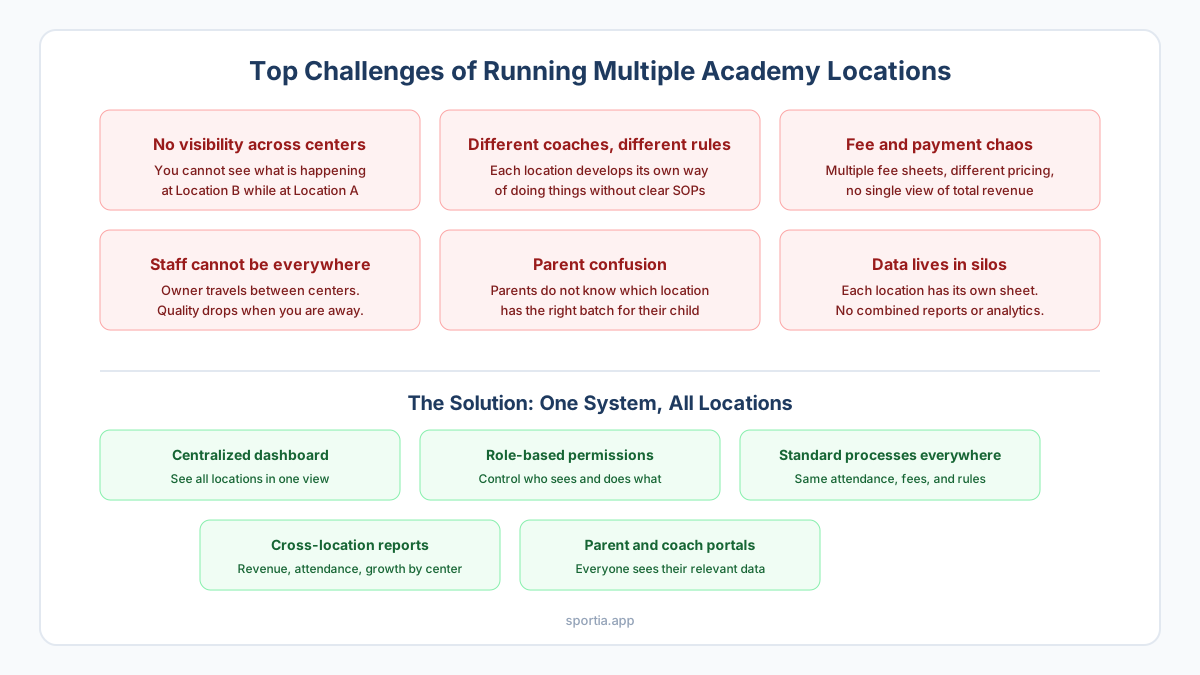
Once center two opens, these problems show up fast:
1. No Visibility Across Centers
When you are at Center A, you have no clue what is going on at Center B. Did the coach show up? How many kids attended? Did the new trial student come? You find out hours later on WhatsApp. Or not at all.
2. Different Coaches, Different Standards
Without clear rules, each center starts doing things its own way. One coach uses paper. The other uses a notebook. One sends fee reminders. The other does not. Parents see the gap.
3. Fee and Payment Confusion
You now have two fee sheets, maybe two bank accounts, and no single view of total income. Students who switch centers create billing chaos. Late payments slip through the cracks faster.
4. Staff Cannot Be Everywhere
As the owner, you used to attend every session. Now you split your time. Quality drops at the center you are not visiting. Staff at the other center may not flag issues until they get bad.
Set Up Standard Processes Across All Locations
The fix is not more effort. It is better systems. Here is what to set up the same way at every center:
Attendance
Every center should mark attendance the same way. If one uses QR check-in and the other uses paper, your data will not match. Pick one method and use it at every center. Read more about how QR attendance works for academies.
Fee Structure and Billing
Use the same fee plans, billing dates, and payment methods at all centers. If Center A charges monthly and Center B per session, parents get confused when they switch. One fee plan across all centers keeps things simple.
Session Schedules
Keep one calendar that shows sessions at all centers. When a class gets shifted at one center, parents should see the change without calling you. A shared digital schedule stops the "I did not know class was off" problem.
Parent Communication
Replace the many WhatsApp groups with a proper system. Parents should only get updates for their child's batch and center. Auto alerts for attendance, fees, and schedule changes keep everyone in the loop. No need to send 50 messages a day.
Who Should See What: Staff Permissions That Prevent Chaos
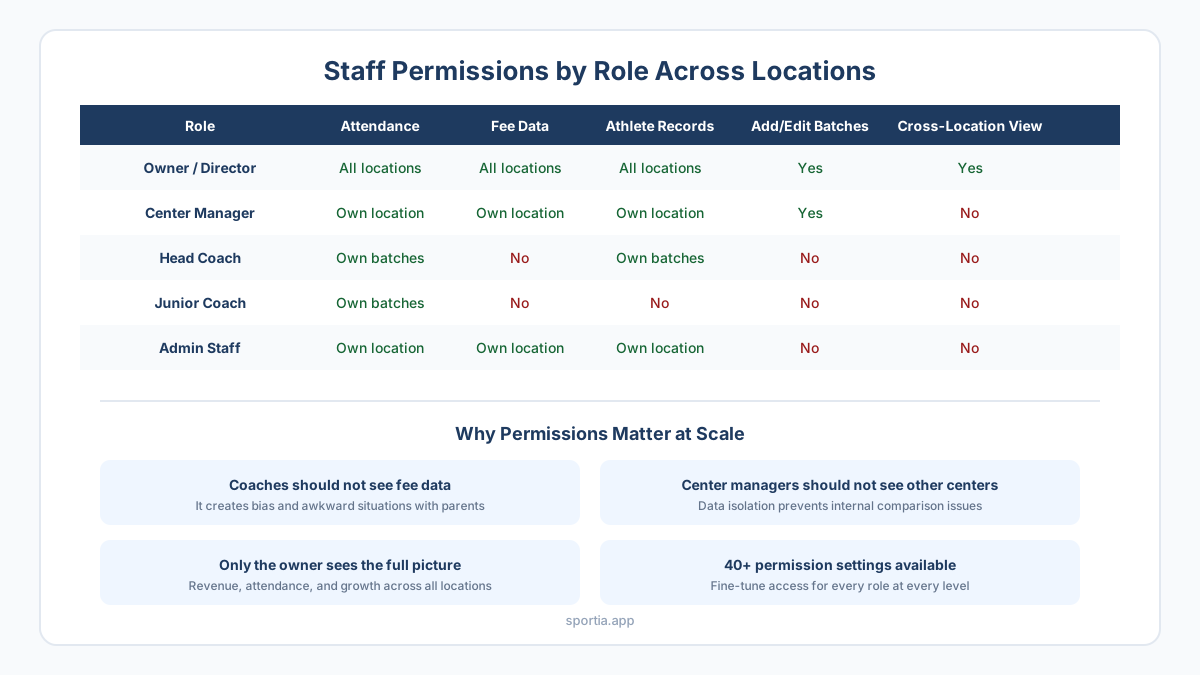
As your team grows, not everyone needs access to everything. A junior coach at Center B should not see fee data from Center A. The right access levels prevent data leaks and staff overreach.
Why This Matters
- Coaches should not see fee data. It can change how they treat students. A coach who knows which parent is late on fees may behave differently without meaning to.
- Center managers should only see their own location. Seeing revenue from other centers can create tension among staff.
- Only the owner should see the full picture. Revenue, attendance, growth, and costs across all centers. That is your command center.
A system with 40+ permission settings lets you control exactly who sees what. This may seem like a lot for 2 centers. But at 3 or more, it is critical.
Centralized vs Decentralized Management
There are two ways to run many centers:
| Approach | How It Works | Best For |
|---|---|---|
| Centralized | Owner makes all calls. Managers follow. All data flows to one view. | 2-3 centers where the owner is hands-on |
| Decentralized | Each manager runs their center like a small business. Owner sets goals and checks results. | 4+ centers where the owner cannot visit each one every week |
Most Indian academies start hands-on and shift to a looser model as they grow. The key is having strong people and good tools before you step back.
Use One System for All Locations
The biggest mistake is using different tools at each center. One uses Excel. One uses a notebook. One uses an app. This always leads to broken data and messy operations.
You need one platform that works across all centers with:
- One dashboard: See attendance, income, and student count for all centers in one view.
- Location-specific data: Coaches and managers see only their center. The owner sees everything.
- Standard processes: Same attendance, billing, and parent portal at every center.
- Role-based access: Control who sees what by role and center.
- Cross-location reports: Compare growth, attendance, and revenue across centers to spot trends.
Platforms like Sportia are built for exactly this. The multi-location view lets you see every center at once. Assign coaches and set access levels for each role. The Pro plan starts at Rs 3,499/month for up to 5 centers.
Expansion Checklist: Before You Open Location 2
- First center is 80%+ full for at least 3 months
- 3-6 months of profit saved for the new center
- At least one trained manager or head coach ready to run it
- Clear rules written for attendance, fees, schedule, and parent updates
- A digital system already running at center one
- Fee plan decided for the new center
- Marketing plan for the new area ready to go
- Insurance and legal setup done for center two
Frequently Asked Questions
How many athletes should you have before opening a second location?
There is no set number. Most academies are ready at 80-100+ athletes at the first center with full batches and a waitlist. The key is steady demand that your current space cannot meet.
Should each location have the same fee structure?
Yes. Same fee plans and billing dates across centers keep things simple for parents and your books. You can adjust slightly for a premium center. But the base plan should stay the same.
How do you maintain coaching quality across multiple centers?
Hire a strong head coach or manager for each center. Write clear rules for how sessions should run. Use digital attendance to check if sessions start on time. Visit each center at least once a week for the first few months.
What is the biggest risk of expanding too early?
Cash flow. A new center takes 3-6 months to fill up. You will pay rent, coach pay, and gear costs during that time with very little coming in. If center one cannot cover these costs, the expansion can sink both.
Can coaches work across multiple locations?
Yes, but manage it carefully. A coach at two centers needs clear timings and travel time between them. A shared calendar that shows all centers prevents double-booking and missed sessions.
What software features matter most for multi-location academies?
The top three: one dashboard for all centers, role-based access that limits what each person sees, and cross-center reports for revenue, attendance, and growth.