
Sports Academy Scheduling: How to Manage Batches, Timetables, and Coaches
Good sports coaching schedule management is not about a prettier timetable. It is about never double-booking a court, never leaving a coach idle, and never sending a parent to the wrong slot. When your batches, coaches, and facilities are managed by hand, small errors stack up fast. This guide shows you how to fix that, and how Sportia automates the whole thing.
Most Indian academies still run schedules on a whiteboard, a WhatsApp group, or one shared Excel sheet. That works for 20 athletes and one court. It breaks the moment you add a second sport, a fill-in coach, or a third batch on the same evening. Let us walk through what goes wrong, and what a real system does instead.
The hidden cost of scheduling chaos
Picture a 60-athlete badminton and table tennis academy in Pune. It runs six batches across four courts each evening. The owner keeps the timetable in her head and on a wall chart. Then one Tuesday, two coaches both book Court 2 at 6 PM. A parent shows up for a batch that quietly moved to Thursday. A new athlete is told the wrong fee slot.
None of these are huge on their own. Together, they cost you real money and trust. Here is where the leaks happen:
- Double-booked courts. Two batches arrive for the same space. One group waits or leaves angry.
- Idle facilities. A court sits empty at peak hours because nobody tracked the gaps. That is paid rent earning nothing.
- Confused parents. A timing changes, the WhatsApp message gets buried, and three families miss the session.
- Coach clashes. One coach is assigned to two batches at once. The second batch has no one to run it.
- Wasted owner hours. You spend Sunday nights rebuilding the week by hand instead of growing the academy.
A single empty peak slot in a tier-2 city can cost ₹8,000 to ₹15,000 a month in lost fees. Add that up across a busy season. Scheduling chaos becomes one of your biggest silent costs.
Recurring, fixed-term, and single-session batches explained
Before you can schedule well, you need the right kind of batch. Most academies treat every group the same. That is the first mistake. There are three types, and each behaves differently.
- Recurring batches. These run on a fixed weekly pattern with no end date. Think of a Monday-Wednesday-Friday cricket batch from 5 PM to 6:30 PM. This is the backbone of most academies.
- Fixed-term batches. These run for a set period, then stop. A six-week summer camp or a two-month exam-prep break batch fits here. The system knows when it ends, so it stops generating sessions on its own.
- Single-session batches. These are one-off events. A guest coach workshop, a trial day, or a parent-watch session. You schedule them once and they do not repeat.
Why does this matter? Because the type decides how sessions get created. A recurring batch should produce sessions automatically every week. A fixed-term batch should stop on its own. Mixing them up by hand is where the manual errors creep in.
In Sportia, you pick the batch type when you create it. The platform handles enrollment, packages, and session quotas for each type. A training package can carry a set number of sessions and a validity window, so a 12-session package expires correctly even if a few classes are missed.
Auto-generating sessions instead of building timetables by hand
Here is the single biggest time-saver in academy scheduling. Stop writing out each session. Let the pattern create them.
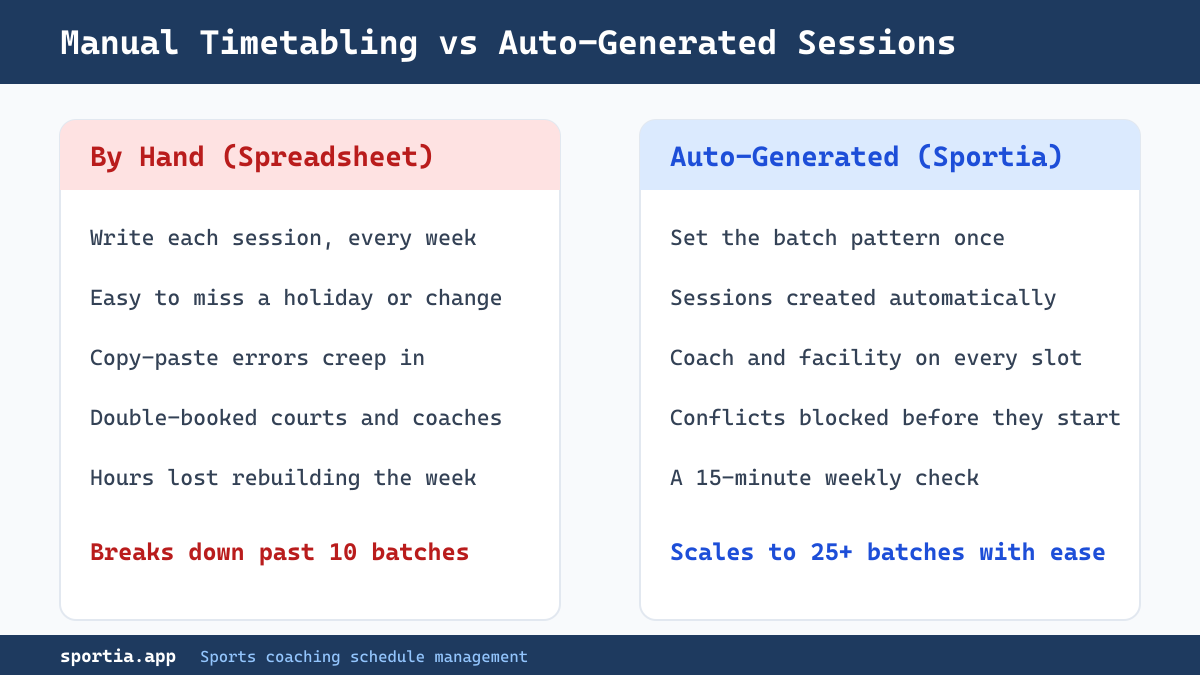
When you build a timetable by hand, you write the same batch on the calendar 12, 20, or 50 times a term. Every entry is a chance to slip. You miss a public holiday. You forget a court change. You copy the wrong coach into one week.
Auto-generation flips this. You set the rule once: this batch, these days, this time, this court, this coach. The system then makes every future session that fits the rule. A Monday-Wednesday-Friday batch gives you three sessions a week. You never touch it again.
This matters most when you grow. Ten batches by hand is painful but possible. Twenty-five batches by hand is a full-time job. Auto-generation is what lets a solo owner run a busy multi-sport academy without a dedicated admin.
Handling substitute coaches and last-minute changes
Coaches fall sick. Buses are late. A senior coach gets pulled into a tournament. Substitute handling is where most manual systems fall apart, because the change has to reach three groups at once: the new coach, the athletes, and the parents.
Most academy coaches in India work part-time. They juggle other jobs, college, or family, so their free hours shift each week. Chasing each one over phone calls wastes time. A better way is to record when each coach is free, then assign a sub against it.
Here is a simple substitute workflow that works:
- Mark the regular coach as unavailable for that session.
- Assign a substitute who is free and qualified for that sport.
- Notify the athletes and parents of the session, not the change to your whole roster.
- Keep a record, so payroll and session logs stay accurate.
Sportia supports a five-level coaching hierarchy, from Head Coach down to Trainee. This matters for substitutes. You can see at a glance who is senior enough to cover a given batch. The schedule lets you set substitute coaches per session and apply facility overrides without rebuilding the whole week.
A practical tip from busy academies: keep one or two assistant coaches with light fixed loads. They become your natural cover pool. A system that shows availability makes this assignment a 30-second job instead of a frantic round of calls.
Facility and court conflicts across multiple sports
The moment your academy runs more than one sport, facility conflicts become the main scheduling headache. A badminton court and a box-cricket net might share the same hall. A swimming pool has lane limits. A multi-purpose ground hosts football one hour and athletics the next.
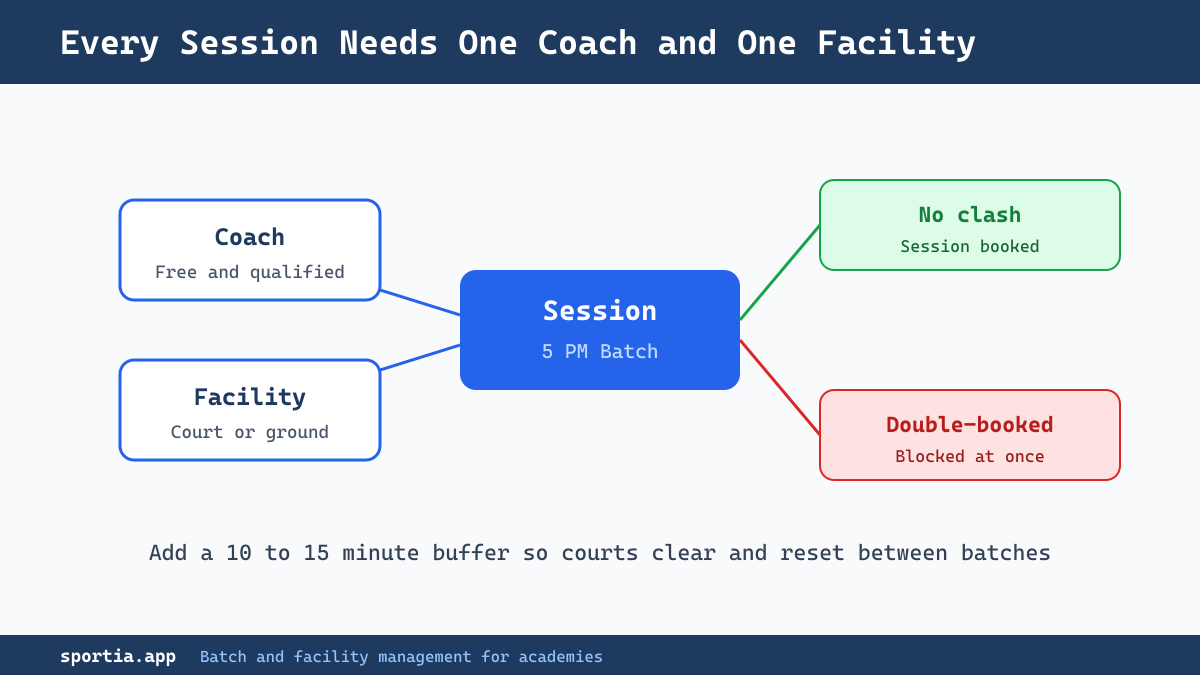
The rule that prevents most clashes is simple: every session needs both a coach and a facility, and neither can be in two places at once. Build that rule into how you schedule, and double-bookings stop before they start.
Common facility traps to watch for:
- No buffer between sessions. A court needs 10 to 15 minutes to clear and reset. Back-to-back bookings cause overlap and chaos at the gate.
- Shared spaces counted twice. If one hall splits into two badminton courts, your system must treat them as separate facilities.
- Peak-hour pile-ups. Everyone wants 5 PM to 7 PM. Spread some batches earlier or to mornings to use your space fully.
Sportia lets you define locations and facility types, assign sports to each, and book sessions against them. When a court is taken, it is taken. This is how a multi-location director keeps three centres straight without juggling three separate sheets.
Day, week, and month views that keep everyone aligned
A good schedule is only useful if the right person can read it quickly. Different people need different views.
- Day view. Best for the coach at the gate. Who is on, which court, which batch, right now.
- Week view. Best for the owner planning the next seven days. Spot the empty slots and the clashes at a glance.
- Month view. Best for the long picture. Plan around holidays, exam weeks, and tournaments before they arrive.
Sportia gives you all three. The calendar shifts between day, week, and month so a coach, an owner, and a parent each see the level of detail they need. One source of truth, no version confusion.
How Sportia automates session generation and schedule changes
Bring the pieces together and you get a schedule that mostly runs itself. With Sportia, you set up a batch once and choose its type. The platform then auto-generates every session that matches the pattern.
When something changes, the schedule adapts. You can swap a substitute coach, override a facility for a single session, or cancel a rained-out class without breaking the rest of the term. Attendance ties straight into the schedule, so the session a coach marks is the same session you planned.
This is the difference between software built for academies and a plain calendar app. A calendar shows you blocks of time. An academy platform sees batches, coaches, courts, enrollment, and attendance as one linked system. If you are still weighing the move from spreadsheets, our guide on the signs your academy needs management software goes deeper.
For larger setups, the same engine scales across centres. If you run more than one location, see how to manage multiple sports academy locations from a single dashboard.
Communicating schedule updates without WhatsApp chaos
A schedule change nobody reads is worse than no change at all. The classic failure is the WhatsApp group where the timing update sinks under 40 unrelated messages and memes.
The fix is to send the update through the same system that holds the schedule. When the change lives where the booking lives, parents get a clear notice tied to the right session. Sportia connects to WhatsApp through Wamafy, its own WhatsApp Business API platform, or through WATI, and sends automated alerts. A cancelled or moved session reaches the right families without you typing 60 messages.
A few habits keep communication clean:
- Make changes in the schedule first, then let the notification follow from it.
- Give parents a parent portal where they can check timings themselves, instead of asking you.
- Keep one channel for official updates, so nothing important gets lost in chatter.
Attendance also feeds this loop. When a coach marks attendance through one of Sportia's three QR attendance modes, the session record stays accurate, and your reports match what actually happened on the court.
A simple weekly scheduling routine you can copy
Even with good software, a light weekly habit keeps your schedule healthy. Try this 15-minute Sunday routine:
- Open the week view and scan for empty peak slots. Fill or promote them.
- Check every batch has a coach and a facility assigned. No blanks.
- Confirm coach availability for the week and pre-assign any known substitutes.
- Mark holidays or special events so no sessions generate on those days.
- Send any timing changes through the platform, once, in one clear message.
Do this every week and scheduling stops being a fire to put out. It becomes a calm 15-minute check. That is the real promise of good batch management: fewer surprises, fuller courts, and parents who always know where to be.
Frequently Asked Questions
What is the best way to manage coaching schedules for a sports academy?
The best way is to define each batch by type, then auto-generate sessions from a fixed pattern instead of writing them by hand. Assign a coach and a facility to every session, and send all changes through one system. This prevents double-bookings and keeps parents informed automatically.
How do you handle a substitute coach at short notice?
Mark the regular coach as unavailable, then assign a free, qualified substitute for that session. Keep an availability record for all coaches so you are not making phone calls during a crisis. A platform like Sportia lets you set substitutes per session without rebuilding the timetable.
How do you avoid double-booking courts in a multi-sport academy?
Make every session require both a coach and a facility, and ensure neither can be booked twice at the same time. Add a short buffer between sessions to clear and reset the space. Software that tracks facility use blocks conflicts before they happen.
Can sports academy software generate a timetable automatically?
Yes. Academy platforms let you set a batch pattern once, such as Monday-Wednesday-Friday at 5 PM, and the system creates every future session that matches. This saves hours each term and removes the copy-paste errors common in manual spreadsheets.
How should you tell parents about a schedule change?
Make the change in your scheduling system first, then send the notice from there so it ties to the exact session. Use a dedicated channel or parent portal rather than a busy WhatsApp group, where updates get buried. Sportia connects to WhatsApp so changes reach the right families directly.
What is batch management in a sports academy?
Batch management is how you organise athletes into groups for training, then schedule, staff, and bill each group. Batches can be recurring, fixed-term, or single-session. Good batch management ties enrollment, coaching, facilities, and attendance together so the academy runs smoothly.
Ready to take control of your timetable? Manage schedules, substitutes, and facility bookings in one place with Sportia. Start your free 14-day trial and set up your first auto-generated batch today.