
Who Should See What: Staff Roles and Permissions in a Sports Academy
Open your academy's WhatsApp group or Excel sheet and ask one question. Who can see every parent's phone number right now? In most Indian academies, the honest answer is everyone. The trainee coach who joined last month can see the same data as the owner. They can see unpaid invoices, medical notes and home addresses for 200 families. Nobody planned it that way, and nobody talks about it either.
That is the problem with sports academy staff permissions. The topic sounds dull until something goes wrong. A coach leaves and takes the parent list to a rival academy. A front-desk volunteer forwards a fee reminder to the wrong family. A parent finds out that six people can read their child's asthma note. Each of these has happened to real academies, and each one could have been stopped by a few clear rules about access.
This guide walks through who on your staff should see what, level by level. It ends with a full permission map for a 12-person, two-location academy that you can copy and adapt.
The problem nobody names: everyone sees everything
Most academies grow the same way. The owner runs the whole thing on their own phone at first. Then a second coach joins, so the owner shares the login. Then a third coach, then a front-desk person, then a branch. By the time there are ten staff, six of them are using two shared passwords. The owner has no idea who changed a fee record last Tuesday.
This is not a small-academy quirk. It is the default state of Indian academies, because WhatsApp and Excel have no idea of roles. A spreadsheet is either shared with you or it is not. Once it is shared, every cell is yours to read, edit or export.
The cost shows up in three ways:
- Data leaks. Parent phone numbers are the most valuable asset an academy owns. A coach who moves to a competitor can walk out with the full list in under a minute.
- Accidental damage. A well-meaning staff member deletes a batch, edits the wrong athlete or marks a paid invoice as pending. With shared logins, you cannot even tell who did it.
- Parent trust. Parents share medical details, home addresses and hints about family income with you. When they learn that a trainee coach can read all of it, some of them quietly stop sharing, and a few leave.
There is now a legal angle too. India's Digital Personal Data Protection Rules were notified in November 2025, and the core duties take effect on 13 May 2027. Rule 6 asks any business that holds personal data online to control who can see it, and to keep access logs for a year. Most athletes at an academy are minors, so the rules on children's data apply as well. Fines for weak data security run up to Rs 250 crore. A small academy will never face that number, but the direction is clear. Access control is about to become a basic duty, not an extra.
What a coach genuinely needs, and what they do not
Start with the person who spends the most time in the system: the coach on the ground. Ask what they need to run a good session, and the list is short.
A coach needs to see the roll for their own batches, mark attendance, view each athlete's sport-specific notes and log training progress. They need to know which athletes have a medical flag that affects training, such as asthma or a healing fracture. They need the schedule for their own sessions and the ability to request a substitute.
A coach does not need to see fee status, invoice history or payment failures. They do not need the parent's full contact details, because the academy should be the channel for parent communication, not the coach's personal phone. They do not need other coaches' batch rolls, and they do not need to edit athlete profiles or delete anything.
A useful test: if a coach left tomorrow, what data would you be worried about? Everything on that list is something they should not have had open access to in the first place.
This is not about distrust. Most coaches are honest and hardworking. It removes the temptation, and the risk of a slip, from a job that has nothing to do with fees or family data. A coach who cannot see invoices cannot be asked by a parent to "adjust" one, which protects the coach as much as the academy.
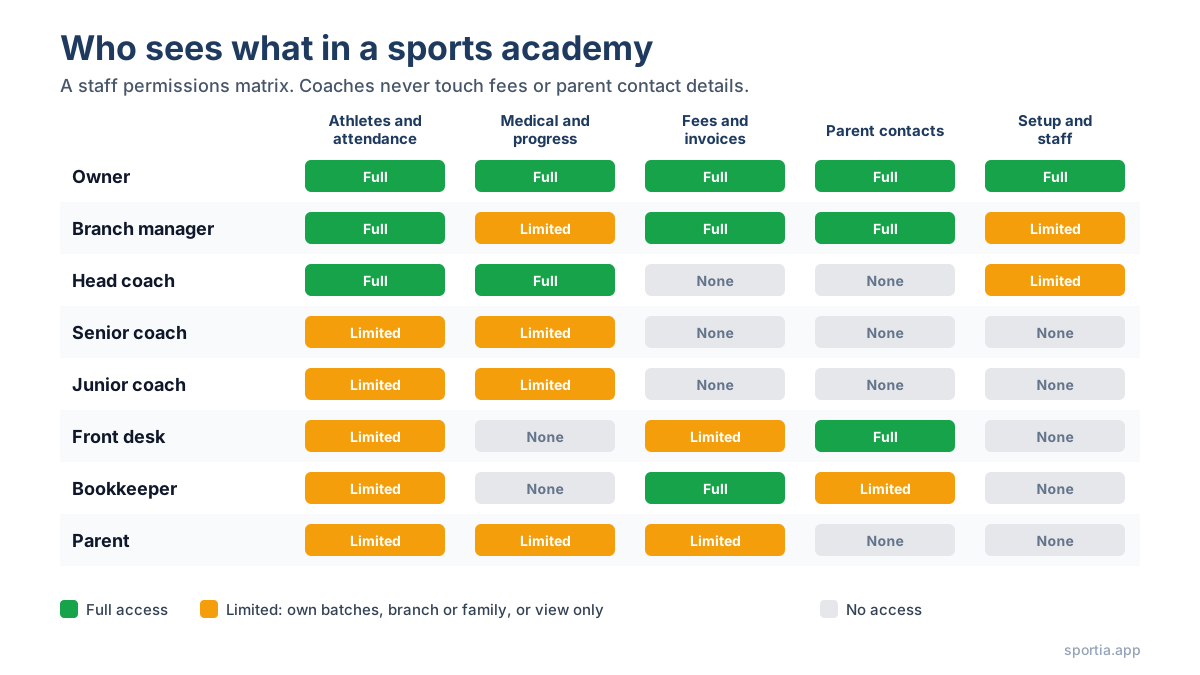
The five-level coaching hierarchy and what changes at each step
Larger academies do not have one type of coach. They have a ladder, and access should climb with it. A five-level structure works well for most Indian academies, and it maps cleanly onto permissions. If you have not set up a formal ladder yet, the guide on building a coaching staff hierarchy covers the roles and pay bands in detail.
Trainee coach
Can view the roll for sessions they assist in and mark attendance when the lead coach allows it. Cannot see medical notes beyond a simple flag, cannot log progress and cannot see anything outside their assigned sessions. This is a shadowing role, so access is view-heavy and edit-light.
Junior coach
Runs their own batches. Can mark attendance, log basic training notes and view sport-specific fields for their athletes. Still no fee data and no parent contact details. Cannot create or delete batches.
Assistant coach
Everything a junior coach has, plus the ability to view medical notes for their athletes, log detailed progress and personal bests, and act as a substitute across batches at their location. Can view the full schedule for their location so they know where they are needed.
Senior coach
Adds the power to create and edit batches in their sport and assign plans from the coaching library. Can view progress for every athlete in their sport and see (but not edit) enrollment status. A senior coach often manages two or three juniors, so they need to see those coaches' attendance records too.
Head coach
Owns the sport across the academy. Can see every batch in their sport at every location, approve substitutes, review how coaches perform, and view enrollment and retention numbers. Still cannot see invoices or edit fee records. Money stays with the admin side, even at the top of the coaching ladder.
The pattern is simple. Each step up adds visibility across more athletes and more coaches, plus a little more edit power. Nobody on the coaching ladder touches money or raw parent contact data. That line between coaching and finance is the single most useful rule in this whole guide.
Front desk and admin: collecting fees without seeing the whole picture
The front-desk person is the role most owners forget when they set up access. They need enough access to do their job well and no more, and the job is mostly about parents and money.
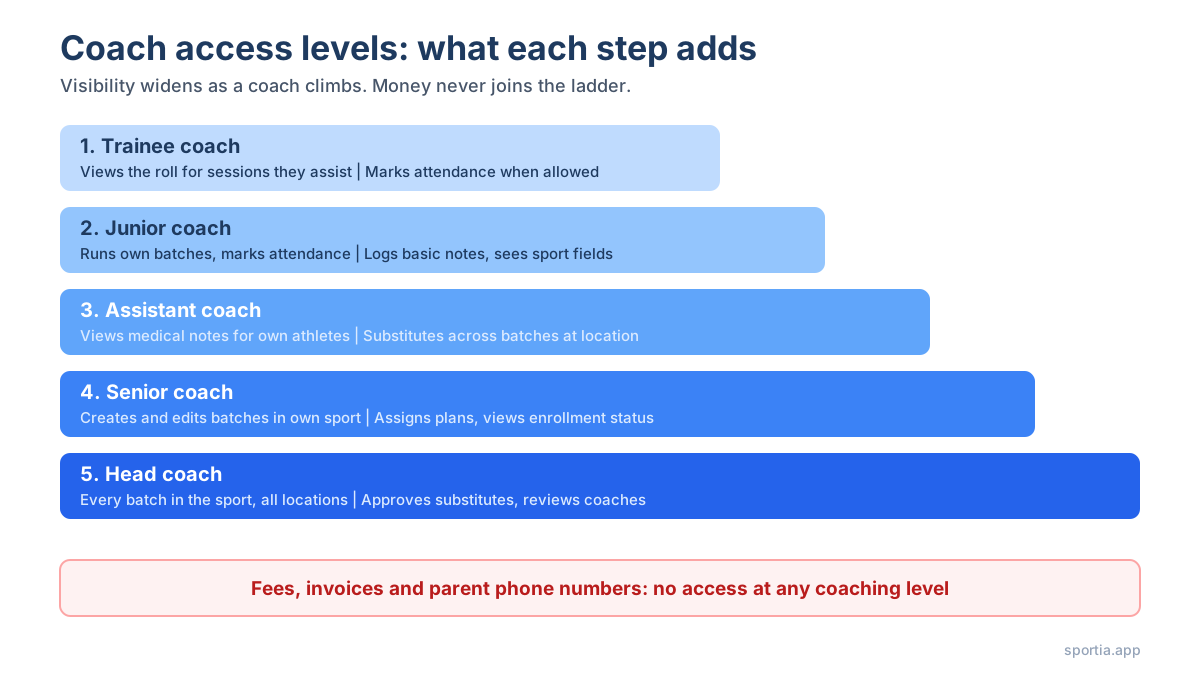
Front-desk staff need to view and create athlete profiles, record enquiries and trials, see their location's schedule, and mark payments received. They need to see which invoices are due so they can follow up. They also need parent contact details, because they are the ones calling.
What they do not need is the power to change fee amounts, give discounts, delete invoices or see money totals across the academy. Recording a payment is different from editing a price. Keep those two powers apart, and the most common form of small-academy fraud (quietly reducing a fee and pocketing the difference) becomes impossible without leaving a trail.
If you have an accountant or a bookkeeper, they get the reverse profile. Full view of invoices, payments, refunds and totals, but no reason to see medical notes, training logs or attendance. A bookkeeper who can read a child's injury history is a leak waiting to happen, even if nothing ever goes wrong.
Branch managers sit above both. They see everything at their own location, including finance, but nothing at other branches. Which brings up the next question.
Multi-location access, and why a branch coach should not see another branch's roll
The moment you open a second location, access becomes a question of location as well as role. A senior coach in Andheri has no reason to see the athlete list in Thane. A front-desk person in Whitefield should not be able to record a payment for a family in Indiranagar.
Three things go wrong when you skip location scoping:
- Mistakes multiply. Two branches with similar batch names ("U-12 Evening") lead to attendance marked against the wrong roll. This happens every week in academies that have not scoped access.
- Poaching gets easier. A coach who leaves to start their own academy near your Thane branch should only have known the Thane families, not the whole database.
- Branch managers lose ownership. When everyone can see everything, nobody feels responsible for one location's numbers.
The fix is to tie each staff member to set locations and let the software filter what they see. Head coaches and the owner get all locations. Everyone else gets one, or sometimes two if they truly work across both. The post on managing multiple academy locations goes deeper into the day-to-day side of this.
Parents and athletes: the narrowest access, and why it builds trust
Parents and older athletes are users too, and their access should be the tightest of all. A parent should see only their own children: attendance, schedule, invoices, progress notes and messages from the academy. Nothing about any other family. Siblings should sit under one parent account so a family with two enrolled kids does not need two logins.
An athlete aged 16 or 17 might get their own login to view their schedule, training plan and personal bests. They should not see invoices, and they should not be able to edit their own medical details. That stays with the parent and the academy.
Narrow parent access is a trust signal, not a limit. When you tell a parent "you will see exactly your child's data and nobody else's," and the software backs it up, they relax. That is when they start sharing the details that make coaching better: the doctor's note, the exam schedule, the anxiety before tournaments. The parent portal guide covers what parents actually want to see and how to roll it out.
When a coach leaves: the offboarding step most academies skip
Ask ten academy owners how they remove a departing coach's access, and at least six will pause. The usual answer is "I removed them from the WhatsApp group." The shared Excel link stays live. The shared login password does not change. The coach's phone still has the parent list synced.
The data from the wider job market is not comforting. Surveys in 2024 and 2025 found that between a quarter and a half of former employees could still log into old employer accounts weeks after leaving. In a small academy with shared passwords, the real number is probably higher.
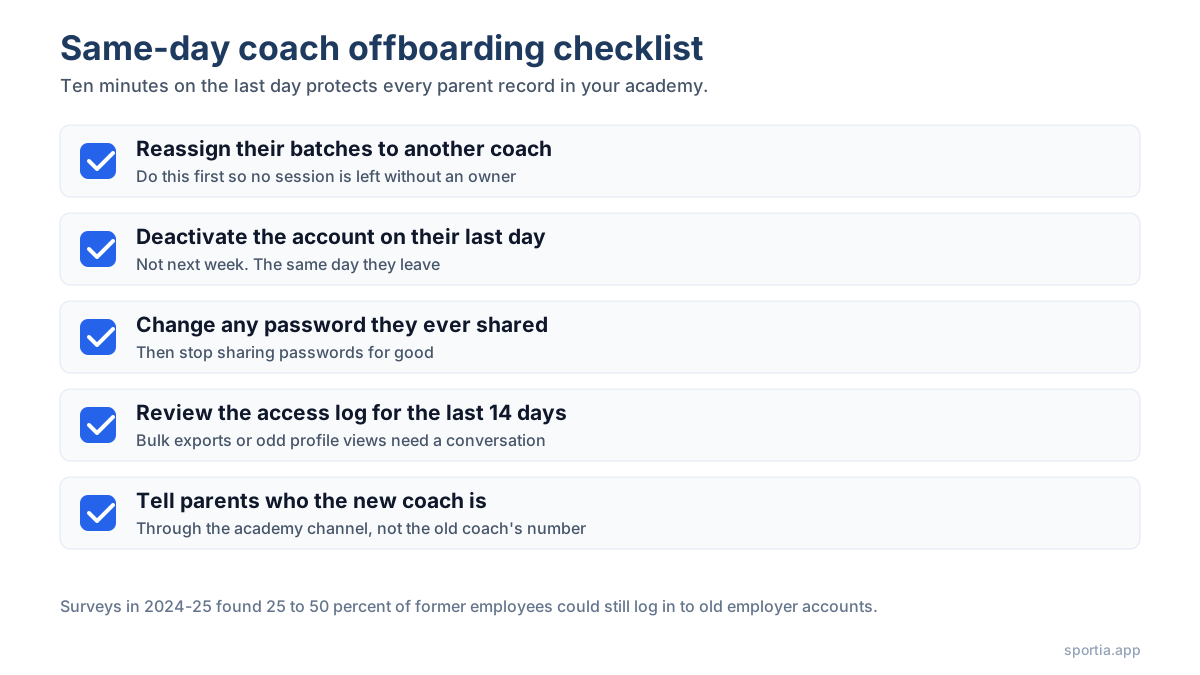
A clean offboarding takes ten minutes if you have set things up properly:
- Deactivate the coach's user account on their last day. Not the week after. The same day.
- Reassign their batches to another coach before deactivation, so no session is left without an owner.
- If they ever had a shared password, change it. Better still, never share passwords again.
- Check the access log for the last two weeks. Bulk exports or unusual profile views in the final days are worth a conversation.
- Tell affected parents who the new coach is, through the academy's channel, so the old coach's personal number is no longer the link.
Most academies skip the log check because they have never had a log. That is the real argument for moving off shared spreadsheets. A tool that records who viewed and edited what gives you the DPDP cover and the peace of mind.
Set it up once with role templates, not person by person
The mistake most owners make when they first get access controls is setting up each person one by one. Coach A gets these twelve permissions, Coach B gets those eleven. Six months later nobody remembers why they differ, and a new coach's setup takes an hour of guesswork.
Role templates fix this. You define "Junior Coach" once, with its exact set of permissions. Every junior coach gets that template. When you promote someone, you switch their template rather than editing 40 checkboxes. When you decide junior coaches should now see medical flags, you change the template and every junior coach updates at once.
Platforms built for academies come with this baked in. Sportia ships with role templates that follow the five-level coaching ladder, plus admin, front-desk and parent roles, built on top of more than 40 individual permissions. You can use the templates as they are or clone and adjust them. Location sits next to the role, so a "Senior Coach at Thane" is one template plus one location, not a custom build.
The other thing role-based systems give you for free is a menu that matches the role. A front-desk user never sees a coaching library menu. A trainee never sees a finance tab. Fewer options means fewer mistakes, and new staff learn faster because they only see what applies to them.
A worked permission map for a 12-staff, two-location academy
Here is a concrete example. Picture a badminton and swimming academy in Pune with two locations, Kothrud and Wakad, around 180 athletes and 12 staff. Fees run from Rs 2,500 to Rs 4,500 a month depending on the sport and batch. The staff and their access might look like this:
| Role (count) | Locations | Athletes and attendance | Medical and progress | Fees and invoices | Parent contacts | Setup and staff |
|---|---|---|---|---|---|---|
| Owner (1) | Both | All, full edit | All, full edit | All, full edit | All | Full |
| Branch manager (2) | Own branch | All at branch, edit | View all at branch | Full at branch | All at branch | Staff at branch, no roles |
| Head coach (2, one per sport) | Both | All in own sport, edit | All in own sport, edit | None | None | Coaches in own sport |
| Senior coach (2) | Own branch | Own sport at branch, edit | Own sport at branch, edit | None | None | None |
| Junior coach (2) | Own branch | Own batches, mark attendance | Flags only, log basic notes | None | None | None |
| Front desk (2) | Own branch | View and create profiles | None | View due, record payments | All at branch | None |
| Bookkeeper (1) | Both | Names only | None | Full view, refunds | Billing contact only | None |
A few points worth noticing in that table. Only three people out of twelve can see fees in full: the owner, the two branch managers and the bookkeeper. Only the owner can create new roles. The head coaches, who are the most senior sports people, see no money at all. Parent phone numbers are visible to five people, all of whom have a daily reason to call parents.
If this academy loses a junior coach to a rival, that coach knew the names of perhaps 40 athletes in their own batches and had no contact details for any of them. That is the difference between an annoyance and a crisis.
Setting this up in a role-based system takes about an hour the first time. Keeping it current takes a few minutes a month. Compared with the cost of one leaked parent list, it is the best hour you will spend on your academy this quarter.
Frequently Asked Questions
What permissions should a coach have in sports academy software?
A coach should be able to view their own batch rolls, mark attendance, see relevant medical flags and log training progress. They should not have access to invoices, fee amounts, full parent contact details or other coaches' batches. Money and family data stay with admin roles.
Should front-desk staff be able to edit fees?
No. Front-desk staff should record payments received and view which invoices are due, but changing fee amounts, applying discounts and deleting invoices should sit with the owner or branch manager. Keeping "record" apart from "edit" is the simplest guard against fee tampering.
Does the DPDP Act apply to a small sports academy?
Yes, if you store athlete or parent data digitally, which almost every academy does. The DPDP Rules 2025 require reasonable security safeguards, including access controls and access logs, and most duties take effect on 13 May 2027. Because most athletes are under 18, the children's data rules also apply.
How do I remove a coach's access when they leave?
Reassign their batches, deactivate their account on their last day, change any shared passwords and review the access log for their final two weeks. Then inform parents of the new coach through the academy's official channel so the old coach's personal number is no longer the link.
What is a role template in academy management software?
A role template is a saved set of permissions, such as "Junior Coach" or "Front Desk", that you assign to a user instead of choosing permissions one by one. Changing the template updates everyone who holds that role, which keeps access the same as your staff grows.
Should parents be able to see other athletes' data?
Never. A parent should see only their own children's attendance, schedule, invoices and progress. Siblings can share one parent account, but no family should be able to view another family's information. This narrow access is what makes parents happy to share sensitive details.
Ready to move your academy off shared logins? Start a 14-day free trial of Sportia and set up roles and permissions for your whole staff using the built-in templates, then adjust them to match your own structure.