

One Academy, Many Sports: Tracking What Actually Matters for Each Discipline
A swimmer and a wrestler join your academy in the same week. The swimmer needs her 50m freestyle time on record, and the wrestler needs his weight category noted before the district trials. If your software gives both of them the same blank profile, someone will end up writing it all in a notebook again.
This is daily life at a multi-sport academy in India. You might run cricket nets in the evening, a pool at dawn and a wrestling mat on weekends. Each sport has its own facts that matter. Good multi sport academy management software should let you record those facts in proper fields, not bury them in a notes box. This guide shows you how to design those fields, which ones are worth keeping, and how to avoid the mess most academies create in their first year.
Why One Athlete Record Cannot Fit Every Sport
Ask three coaches what they need to know about a new athlete, and you will get three different lists. A cricket coach wants batting hand, bowling style and role. A swimming coach wants the main stroke and best times. A wrestling coach wants weight category and style, because freestyle and Greco-Roman are trained differently.
Almost none of these overlap. A standard athlete form has name, date of birth, phone number and address. That covers the office, but it does not cover the coach. So the coach keeps a separate register, and now your academy has two sources of truth.
Here is what each sport usually needs on record:
| Sport | Fields coaches actually use |
|---|---|
| Cricket | Batting hand, bowling style (pace or spin), primary role, owns full kit |
| Swimming | Primary stroke, pool level (learner or squad), swim test passed |
| Wrestling | Style, weight category, last weigh-in date |
| Badminton | Playing hand, singles or doubles focus, grip type |
| Football | Preferred foot, primary position, secondary position |
The Hidden Cost of the Notes Field
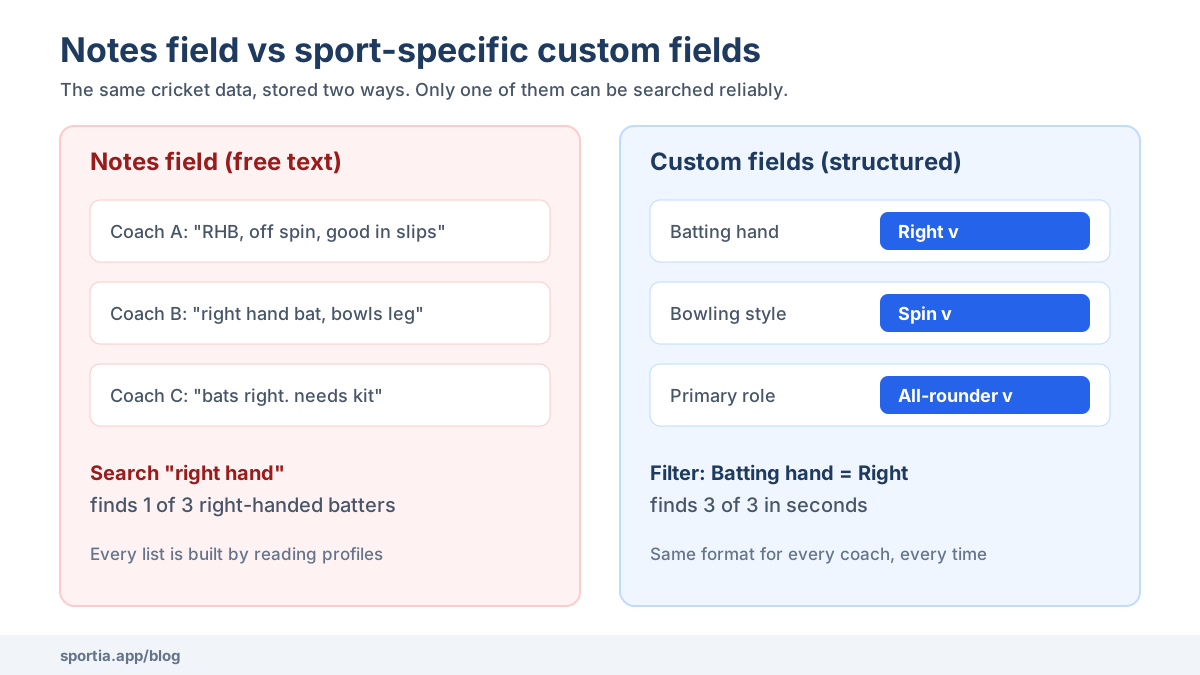
Most generic tools handle this with one large notes box, so coaches type whatever they like, and after a year you find "RHB, off spin" in one profile. Another says "right hand bat" and a third says "bats right", so a search for any one phrase misses the other two.
Now picture a wrestling academy near Sonipat with 45 athletes. The state association announces trials, and the head coach needs everyone in the 48 kg category. With only a notes field, he opens all 45 profiles individually, which takes an entire evening, and he may still miss a boy whose note says "48kg" without a space.
The costs pile up quietly:
- Lost time: every list is built by hand, so it is built less often.
- Wrong decisions: an athlete gets left out of a trial because his data was hidden in a sentence.
- Lost knowledge: when a coach leaves, their shorthand leaves with them.
- Messy parents' data: families fill the same details twice for two sports.
Sport-Specific Custom Fields, Explained Simply
A custom field is simply an extra box you add to the athlete form, and the difference from a notes box is that each field has a defined type. It can be a dropdown, a number, a date, a yes or no switch, or short text. Because the type is fixed, every coach enters the data the same way.
Good multi sport academy management software uses two layers of fields:
- Base fields apply to every athlete, whatever the sport. School name and T-shirt size are good examples.
- Sport fields appear only when that sport is picked. A swimmer never sees "batting hand", and a cricketer never sees "primary stroke".
In Sportia, you build these under Settings, in the Customize Forms page. You choose "Every Sport" for base fields or "One Sport" for sport fields. You can also start from a ready template, since Sportia includes templates for more than 120 sports. You preview a template, remove what you do not need, and then apply it. Nothing is forced on you.
Designing Your Field Set: The Four or Five That Get Used
Templates are a starting point, not a finish line, and the biggest mistake academies make is keeping every field a template offers. A form with 25 empty boxes teaches staff to skip the form entirely.
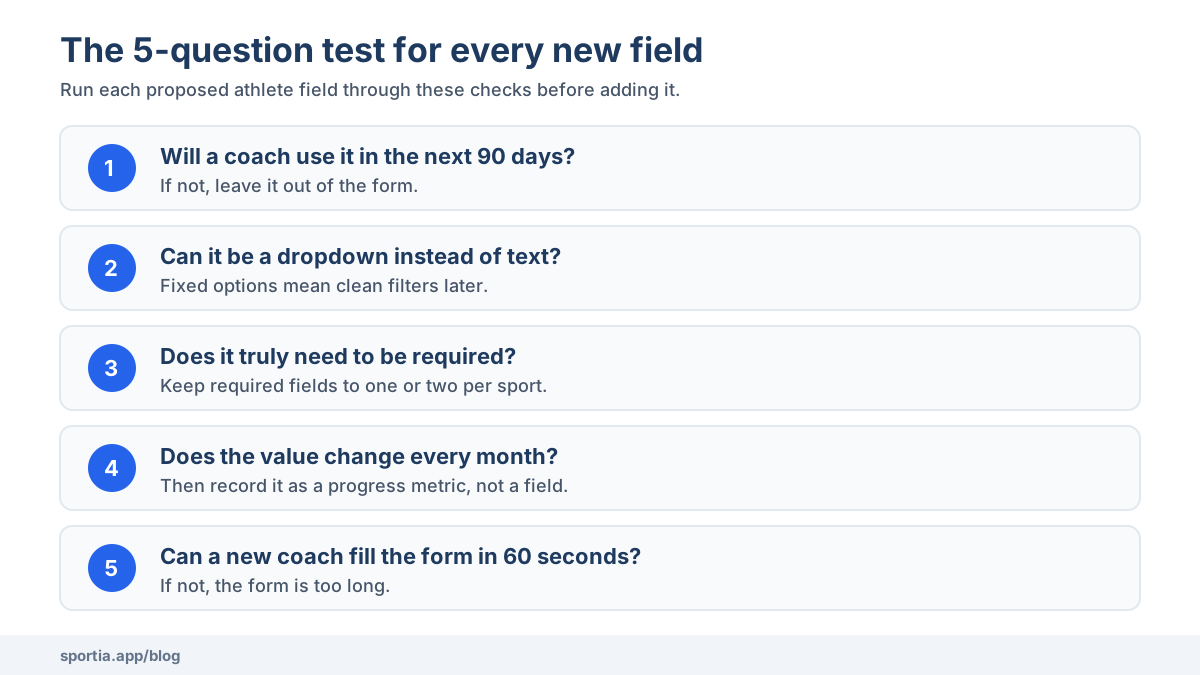
Use one simple test for each field. If no coach will look at it in the next 90 days, leave it out. Most sports settle at four or five fields that people really use.
Some other rules that save pain later:
- Prefer dropdowns to text. "Left" and "Right" as options beat a free text box every time, because you can filter on them.
- Make only one or two fields required. If parents hit ten mandatory boxes during enrollment, some of them will give up halfway.
- Keep fast-changing numbers out of the profile. Body weight and best times change every month, so they belong in progress tracking, where you can see the trend.
- Write the help text. A short line such as "Tick yes only after the 25m test" stops two coaches using one field in two ways.
A final check works well. Hand the form to a newly hired assistant coach, and if they cannot fill it in 60 seconds, the form is too long.
Medical and Consent Details Every Sport Needs
Some information matters no matter which sport a child plays. These should never be optional extras added by one coach:
- Blood group, known allergies, medical conditions and current medicines
- At least one emergency contact, with a primary contact clearly marked
- Guardian details, including who is allowed to pick the child up
- Whether the athlete is a minor, and the status of parental consent
In Sportia, these are built into every athlete profile rather than left to custom fields. The system flags a minor on its own from the date of birth. It also tracks consent as pending, approved or revoked. Medical details and emergency contacts are stored encrypted, which matters because this is health data about children.
There is a legal side too. India's Digital Personal Data Protection Act, 2023, expects verifiable parental consent before you process a child's personal data. A clear consent status on every profile makes that far easier to show if a parent ever asks.
Reporting on Data You Can Actually Filter
Structured fields pay off the moment you need a list. Go back to the Sonipat coach. With a weight category dropdown, he filters the athlete list by "48 kg" and has the answer in seconds. A cricket coach can pull every left-handed batter the same way before a special nets session.
In Sportia, the athlete list has a custom field filter that works with dropdowns, numbers, dates, text and yes or no fields. You pick one field, pick a condition such as "equals" or "greater than", and the list narrows at once. You can then select everyone who matches and change their status in bulk, which helps at season end.
For numbers that change over time, a profile field is the wrong tool. Swim times and fitness scores work better as progress metrics, where each new result is saved with a date. Sportia records personal bests automatically and shows how much each athlete has improved. The guide to athlete progress tracking covers how to set this up. If your swimmers or runners train with wearables, you can go further with wearable athlete monitoring.
Adding a New Sport Without Rebuilding Everything
Many academies grow by adding a sport rather than a building. A cricket academy in Indore adds a pickleball court, or a swimming club in Kochi starts a Saturday archery batch. With the right setup, this should take an afternoon, not a month.
The steps are simple:
- Add the new sport to the location where it will run.
- Open the athlete form for that sport, and apply a template or add four fields yourself.
- Leave your base fields alone, because they carry over to the new sport automatically.
- Test the form with one real athlete before opening enrollment.
If the new sport runs at a second venue, read the guide on how to manage multiple sports academy locations first. Each location can offer its own mix of sports.
A Worked Example: Cricket, Swimming and Wrestling Under One Roof
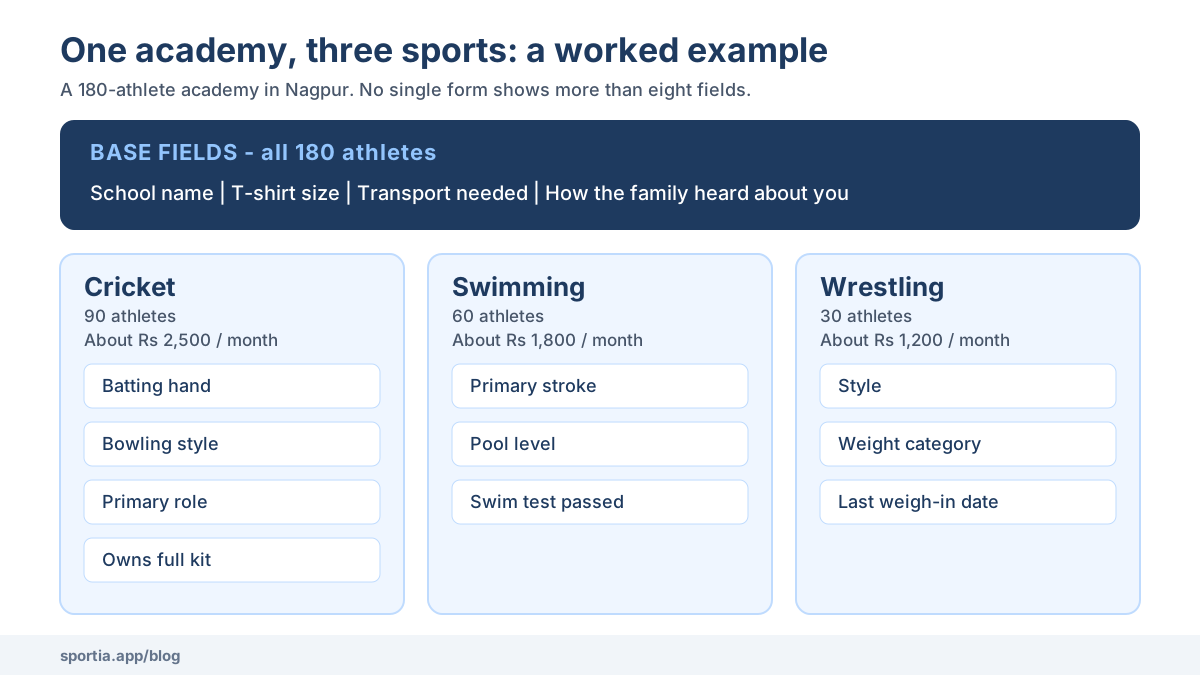
Take a 180-athlete academy in Nagpur. It has 90 cricketers at about Rs 2,500 a month and 60 swimmers at about Rs 1,800. It also has 30 wrestlers at about Rs 1,200. Three head coaches run the three sports, and one office manager handles fees, enrollment and parent questions.
Here is a field set that works for them:
- Base fields (all 180 athletes): school name, T-shirt size, transport needed, and how the family heard about the academy.
- Cricket: batting hand, bowling style, primary role, owns full kit.
- Swimming: primary stroke, pool level, swim test passed.
- Wrestling: style, weight category, last weigh-in date.
That is only seven or eight boxes on any single form, so parents finish enrollment in a couple of minutes. Best times and body weight go into progress tracking instead, so coaches can see the trend.
Consider what changes in practice: before state trials, the wrestling coach filters by weight category in seconds. The cricket coach groups left-arm spinners for a special session. The office manager can see which parents still owe a transport answer. A girl who plays both cricket and swimming has a profile for each sport, so her family does not type her details twice.
None of this requires a large budget or a technical expert, only one afternoon of honest thinking about what your coaches really use.
Frequently Asked Questions
What is multi sport academy management software?
It is software that runs enrollment, fees, attendance and athlete records for an academy that offers more than one sport. The key difference from basic tools is that each sport can have its own athlete fields, batches and coaches, all under one login.
How many custom fields should a sports academy track per sport?
Four or five is enough for most sports. Add a field only if a coach will use it in the next 90 days. Long forms lead to empty fields and parents who give up during enrollment.
Can one athlete be enrolled in two different sports?
Yes. In good academy software, one athlete can have a profile for each sport they play. Base details like school and guardian are entered once, and each sport adds its own short set of fields.
Should athlete weight be a profile field or a progress metric?
Keep the weight category as a profile field, since it changes rarely and you will filter by it. Record actual body weight as a progress metric with a date, so coaches can see changes before a weigh-in.
Is parental consent required to store a child athlete's data in India?
Yes. The Digital Personal Data Protection Act, 2023, expects verifiable parental consent before processing personal data of anyone under 18. Keep a clear consent status on every minor's profile and store medical details securely.
Set Up Fields That Match Every Sport You Run
A multi-sport academy should not force a swimmer and a wrestler into the same form. Start small: pick your base fields, then choose four or five fields for each sport and test them with one real athlete. You can set up sport-specific fields for every discipline you run in Sportia with a 14-day free trial, and see how much faster your next trial list comes together.