
Sports Academy Automation: 6 Tasks to Stop Doing by Hand
Count the messages you sent last week that said almost the same thing. "Fees are due on the 5th." "Training is at 6 AM tomorrow." "Your son has two sessions left." "Please return the bibs." For most owners of a 100-athlete academy, that list runs into the hundreds. None of it needs your judgement, but all of it needs your time.
That is the real case for sports academy automation. The point is not to replace you with software. It is to hand the repeat work to a system, so your time goes to the few conversations that only you can have. This guide walks through the tasks worth automating first, what each one should do, and the jobs you should never hand to a machine.
The Hidden Hours: A Week of Admin in a 100-Athlete Academy
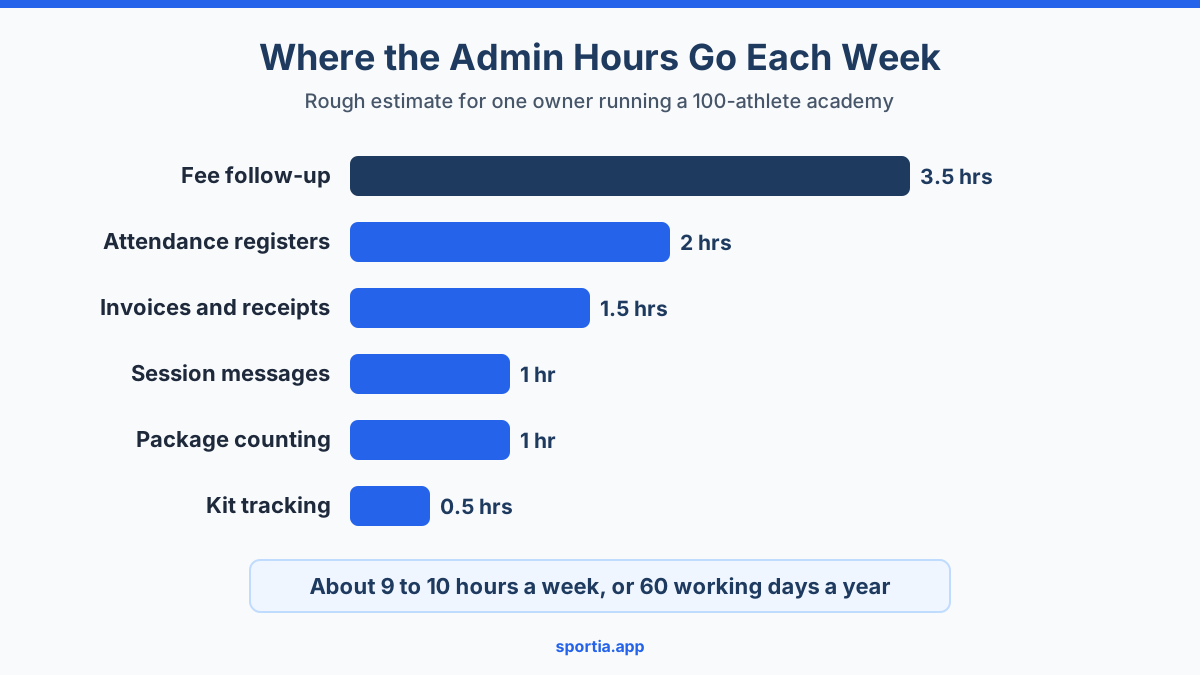
Picture a cricket and football academy in a tier-2 city like Coimbatore or Indore. It has 100 athletes across six batches, two coaches and one owner who does all the admin. Here is a rough estimate of where that owner's week goes. Your numbers will differ, so treat this as a starting point for your own count.
- Fee follow-up: about 3 to 4 hours. In a typical month, 25 to 30 families pay late, and each one takes a message, a follow-up and sometimes a call.
- Making invoices and receipts: about 1.5 hours a week, most of it bunched into the first days of the month.
- Attendance registers: about 2 hours, between calling names, tallying sheets and answering "how many classes did he attend?"
- Session messages: about 1 hour of "tomorrow's batch is at 4 PM, not 5 PM" style posts.
- Package counting: about 1 hour, working out who has used up a 12-session pack.
- Kit tracking: 30 minutes chasing cones, bibs and rackets.
That adds up to around 9 to 10 hours a week. Over a year, that is close to 500 hours, or about 60 full working days. Most of it follows a fixed rule, and almost anything that follows a fixed rule can be automated.
How to Tell If a Task Should Be Automated
Before you switch anything on, run each task through three quick questions about how it really works.
- Does it follow a fixed rule? "Every month on the 1st" or "when three sessions are left" is a rule. "When a family seems unhappy" is not.
- Is the message the same for everyone? A fee reminder is. A talk about a child's poor attitude is not.
- Would a delay cost you money or trust? A late invoice delays payment. A forgotten reminder leads to an empty court.
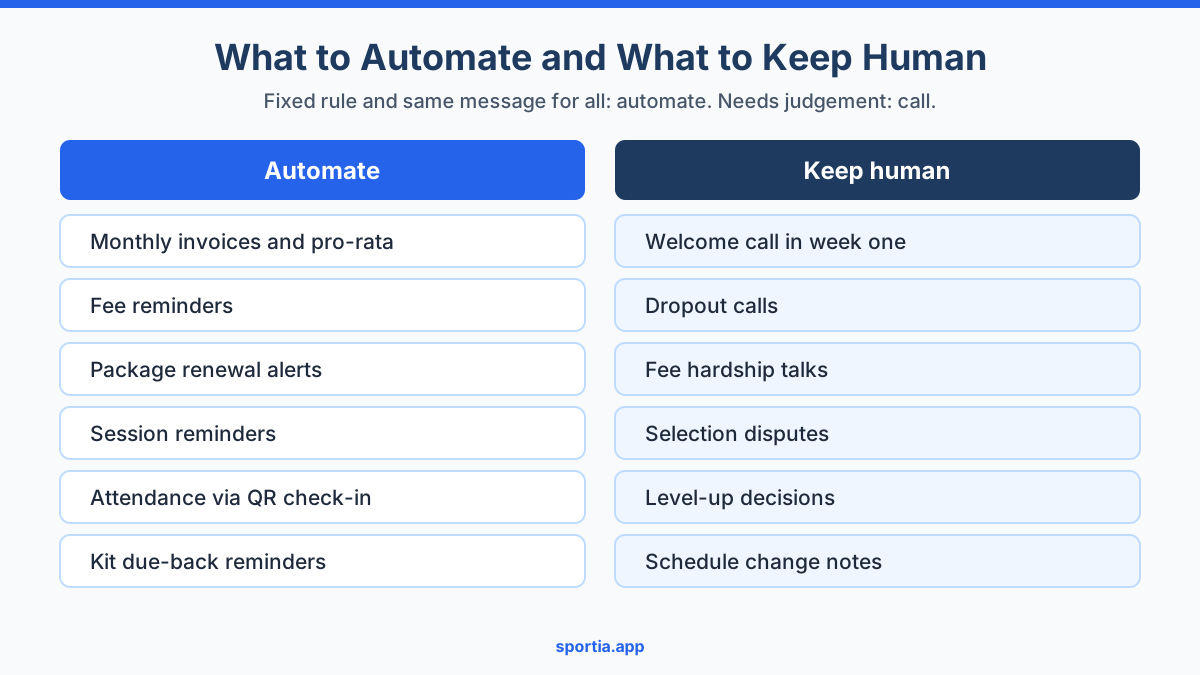
If the answer to all three is yes, automate it. If the first two are no, keep it human. The sections below follow that rule, task by task.
1. Monthly Invoices That Make Themselves, Including Pro-Rata
Invoicing is the best place to start sports academy automation, because every other money task depends on it. If the invoice is late, then the reminder is late, and the payment arrives late as well.
A good system should raise each athlete's invoice on the same day every month without you lifting a finger. It should also handle the awkward case of a child who joins mid-month. Most owners either charge the full month, which feels unfair to the parent, or skip the bill until next month, which loses money.
Pro-rata solves this. Take a monthly fee of Rs 3,000. A child joins on 16 October, a month with 31 days. Counting the joining day, there are 16 days left. So the bill is Rs 3,000 divided by 31, times 16, which comes to about Rs 1,548. Doing that by hand for five new joiners a month is easy to get wrong. A system does it the same way every time.
In Sportia, monthly invoices for recurring batches are raised on the 1st of each month and emailed to the parent or athlete who pays. When a child enrols mid-month, the first invoice is pro-rated by the number of days left, and the line item shows the day count so parents can see the maths. By default, payment is due by the 5th.
What to check before you switch it on
- Make sure every athlete has the right billing contact. If the bill goes to a 12-year-old's email, nobody pays it.
- Agree a written fee policy that matches what the system does, including pro-rata for joiners.
- Run the first month alongside your old method, and compare the totals before you trust it fully.
2. Fee Reminders Before and After the Due Date
Most late fees are not a refusal to pay. They are a busy parent who forgot. A polite nudge a few days before the due date fixes most of these cases before they become awkward. Our guide to fee reminders that parents do not hate covers the wording in detail.
The pattern that works best has two stages:
- Before the due date: one friendly reminder, about three days ahead. It should state the amount, the due date and how to pay.
- After the due date: a short series of firmer reminders, spaced a few days apart, with a clear final date.
In Sportia, the reminder before the due date goes out by WhatsApp and email, three days ahead by default. It needs your academy's WhatsApp to be connected and the fee reminder switched on. After the due date, overdue reminders go out by email at set stages, and they are on by default.
One thing to know before you rely on this: the default overdue rules end with the enrolment being cancelled if the bill stays unpaid for about 25 days. That is reasonable for most academies, but if you have a loyal family going through a hard month, you want to know before the system acts. Check the grace settings and match them to your own policy.
Make paying easy
A reminder only works if paying takes less than a minute. Online payment lets parents pay by UPI or card from their phone. In Sportia, parents can pay an invoice online through your academy's own Razorpay account, and the payment is recorded against the invoice without you typing anything. For more on this, read online fee collection and invoicing.
On cost, WhatsApp utility messages such as reminders are cheap. Provider price lists in 2026 put them at roughly 12 to 15 paise each in India. So 100 fee reminders a month cost about Rs 15, which is far less than one unpaid fee.
3. Package Alerts When Sessions Run Low
If you sell session packs, such as 12 sessions for Rs 4,800, you know the problem. A child uses the last session, nobody notices, and two weeks later the parent asks why they were never told. Either you lose the renewal, or you end up training the child for free.
Two alerts fix this. The first goes out when three sessions are left, so the parent has time to renew. The second goes out when the pack is used up. Our post on training packages and session quotas explains how to price and structure the packs themselves.
In Sportia, both alerts go to the athlete and linked parents by email, with WhatsApp as an option. They fire when the athlete checks in with the entrance QR code or their personal QR code, because that is the moment a session is counted. So if you sell packages, QR check-in is not optional, because it is what keeps the count honest.
4. Session Reminders to Athletes and Parents
Early morning batches lose children to forgetful mornings. A reminder the day before helps, and it costs you almost nothing once it is properly set up.
In Sportia, session reminders go out by WhatsApp, 24 hours before each session by default, to the parent who pays. You can change the lead time and add the athlete as a recipient. Like the fee reminder, this needs your WhatsApp connected and the reminder switched on.
Be careful about one gap. If you cancel or move a single session, Sportia does not message families about it. Schedule changes still need a message from you. That is not all bad, because a change is exactly the moment a short personal note works better than a template.
5. QR Check-In Instead of a Paper Register
A paper register takes ten minutes of each batch, gets wet in the monsoon and tells you nothing until someone types it up. QR check-in moves that work to the athlete. The child or parent scans a code at the gate, and attendance is marked before the warm-up starts.
There are three common setups, which our guide to QR attendance modes compares in detail:
- A code on the coach's screen that changes, so it cannot be shared on a group chat.
- One code at the entrance for the whole location.
- A personal code for each athlete, which staff scan at the gate.
In Sportia, a check-in after the first 10 minutes is marked late, not present. That gives you real data on lateness, which is often the first sign a family is losing interest. Sportia can also email parents when a coach marks a child absent for three sessions in a row, so a fading athlete does not go unnoticed for a whole month.
6. Equipment Due-Back Reminders
Kit disappears slowly, and usually without anyone noticing. A set of cones goes home with a coach, a racket goes to a tournament, and six months later you are buying replacements. At Rs 2,000 to Rs 5,000 for a good cricket bat, a few lost items a year add up.
The fix is simple. Record who took what and when it is due back, then let the system chase it. Sportia's Inventory add-on does this. It sends a reminder on the due date, then a reminder every three days, up to three times by default. Reminders go in the app and by email, not by WhatsApp. You can change the timing and the number of reminders to suit your academy.
Sports Academy Automation: What Should Stay Human
This is where many academies go wrong. Once reminders work, it is tempting to automate everything. But some messages lose all their value the moment they come from a template.
The welcome call
An enrolment confirmation email is useful. Sportia sends one automatically, with the athlete's QR code inside. But it is not a welcome. A two-minute call from you in the first week, asking how the child found the first session, does more for retention than any email. Parents remember exactly who called them.
The dropout call
An automated alert can tell you a child has missed three sessions in a row. It cannot find out why. Was it exams, a bully in the batch, a fee problem, or a coach the child does not like? Only a phone call will tell you the real reason. Our post on why young athletes quit sports lists the reasons that come up most often.
The difficult conversation
A family that has not paid for two months, a parent angry about team selection, a child who is not ready to move up a level. These need tone, timing and listening. An automated message in these moments makes the problem worse, because it tells the family they are a line in a spreadsheet.
A good rule: automate the reminder, never the conversation. Use the hours you save to make more of the calls that matter.
Common Mistakes When Automating an Academy
- Switching everything on at once. Turn on one automation at a time, and watch it for a full month before adding the next.
- Wrong contact details. An automated reminder to an old number is worse than no reminder, because you think it went out. Clean up your contact list before you begin.
- Not telling parents. Send one message explaining the new invoices and reminders, so the first one does not look like spam.
- Forgetting the defaults. Many reminder settings are off until you switch them on, and some, like overdue rules, act on their own. Read each setting once.
- Expecting automation to fix a broken policy. If your fee policy is unclear, automated reminders will spread the confusion faster.
The Order to Set Things Up
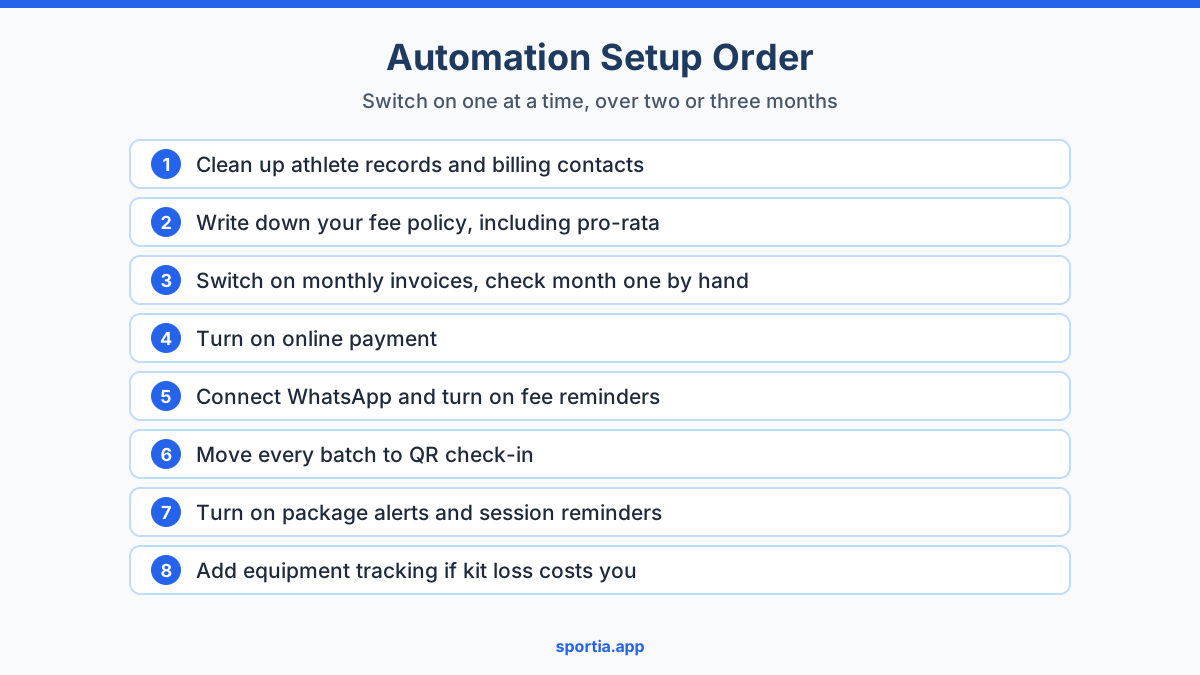
If you are starting from a notebook and a WhatsApp group, here is a sensible order. It puts the money tasks first, since they pay for the rest. If you run the academy alone, our guide to tools and systems for running a sports academy solo covers the wider setup.
- Clean up athlete records and billing contacts.
- Write down your fee policy, including pro-rata and late fees.
- Switch on monthly invoices and check the first month by hand.
- Turn on online payment.
- Connect WhatsApp and turn on fee reminders.
- Move every batch to QR check-in.
- Turn on package alerts and session reminders.
- Add equipment tracking if kit loss is a real cost for you.
Spread this over two or three months. A rushed rollout usually leads to incorrect bills, and one incorrect bill can undo months of trust with a family.
Frequently Asked Questions
What tasks can a sports academy automate?
The best tasks to automate are the ones that follow a fixed rule. These include monthly invoices, fee reminders, package renewal alerts, session reminders, attendance through QR check-in and equipment due-back reminders. Tasks that need judgement, such as dropout calls, should stay human.
How do I automate fee reminders for my sports academy?
Use academy software that raises invoices on a fixed date and sends reminders by WhatsApp or email before and after the due date. Add an online payment option so parents can pay straight away. Check that every athlete has the right billing contact first.
Is it safe to send fee reminders on WhatsApp?
Yes, if you use the official WhatsApp Business API through a provider rather than a personal number. Reminder messages are classed as utility messages and cost only a few paise each in India. Keep the tone polite and include the amount, due date and payment link or method.
How is pro-rata fee calculated for a mid-month joiner?
Divide the monthly fee by the number of days in the month, then multiply by the days left, counting the joining day. For a Rs 3,000 fee and a child joining on 16 October, that is about Rs 1,548. Put the method in your written fee policy so parents know what to expect.
Will automation make my academy feel less personal?
Only if you automate the wrong things. Reminders and invoices are expected to be routine, so parents rarely mind them. Use the time you save for welcome calls, check-ins with fading athletes and honest talks with parents.
How much time can automation save a sports academy owner?
For a 100-athlete academy, a rough estimate is 6 to 8 hours a week, out of around 9 to 10 hours of routine admin. The biggest savings come from invoicing, fee follow-up and attendance. Your actual figure depends on how many late payers and batches you have.
Start With One Automation This Month
You do not need to automate your whole academy this week. Pick the task that costs you the most hours, which for most owners is fee follow-up, and fix that first. Then work your way down the list, one task at a time.
If you want invoices, reminders, package alerts and QR attendance in one place, try Sportia free for 14 days. Switch on automated invoicing and reminders, run them for one billing cycle, and see how many hours come back to you.